<?xml version="1.0" encoding="UTF-8" ?>

<rdf:RDF
 xmlns="http://purl.org/rss/1.0/"
 xmlns:rdf="http://www.w3.org/1999/02/22-rdf-syntax-ns#"
 xmlns:dc="http://purl.org/dc/elements/1.1/"
 xmlns:content="http://purl.org/rss/1.0/modules/content/"
 xml:lang="ja"
>

<channel rdf:about="https://www.kurakazu.com/blog/feed/rss10/">
<title>パソコン販売・修理・サポート・データ復元は地元の店舗にお任せ｜株式会社クラカズコミュニケーションズ スタッフブログ</title>
<link>https://www.kurakazu.com/blog/</link>
<description>スタッフブログ</description>
<dc:language>ja</dc:language>
<dc:date>2026-05-01T16:41:23+09:00</dc:date>
<items>
<rdf:Seq>
<rdf:li rdf:resource="https://www.kurakazu.com/blog/2024/11/14898/" />
<rdf:li rdf:resource="https://www.kurakazu.com/blog/2024/10/14896/" />
<rdf:li rdf:resource="https://www.kurakazu.com/blog/2024/09/14894/" />
<rdf:li rdf:resource="https://www.kurakazu.com/blog/2024/09/14893/" />
<rdf:li rdf:resource="https://www.kurakazu.com/blog/2024/09/14892/" />
<rdf:li rdf:resource="https://www.kurakazu.com/blog/2024/09/14891/" />
<rdf:li rdf:resource="https://www.kurakazu.com/blog/2024/08/14890/" />
<rdf:li rdf:resource="https://www.kurakazu.com/blog/2024/08/14889/" />
<rdf:li rdf:resource="https://www.kurakazu.com/blog/2024/08/14888/" />
<rdf:li rdf:resource="https://www.kurakazu.com/blog/2024/06/14886/" />
<rdf:li rdf:resource="https://www.kurakazu.com/blog/2024/04/14885/" />
<rdf:li rdf:resource="https://www.kurakazu.com/blog/2023/06/14883/" />
<rdf:li rdf:resource="https://www.kurakazu.com/blog/2023/06/14882/" />
<rdf:li rdf:resource="https://www.kurakazu.com/blog/2023/06/14881/" />
<rdf:li rdf:resource="https://www.kurakazu.com/blog/2023/06/14879/" />
<rdf:li rdf:resource="https://www.kurakazu.com/blog/2023/05/14880/" />
<rdf:li rdf:resource="https://www.kurakazu.com/blog/2023/05/14519/" />
<rdf:li rdf:resource="https://www.kurakazu.com/blog/2023/05/14516/" />
<rdf:li rdf:resource="https://www.kurakazu.com/blog/2023/04/14513/" />
<rdf:li rdf:resource="https://www.kurakazu.com/blog/2023/04/14205/" />
</rdf:Seq>
</items>
</channel>

<item rdf:about="https://www.kurakazu.com/blog/2024/11/14898/">
<title>新しい検索体験！ChatGpt Searchを使ってみよう！</title>
<link>https://www.kurakazu.com/blog/2024/11/14898/</link>
<description>インターネットで情報を調べるとき、通常の検索エンジンではリンクをたくさん見て、さらにその中から必要な情報を探す作業が必要ですよね。でも、ChatGPT Searchなら、必要な情報がダイレクトに表示され、効率よく知りたい答えにたどり着けるんです♪ChatGPT Searchとは？


ChatGPT Searchは、OpenAIのAIであるChatGPTに質問を入力するだけで、知りたい情報をAIが自然な文章で回答してくれる機能です。


ChatGPT Searchの使い方


使い方はとても簡単。検索ボックスに質問や調べたい内容を入力するだけでOKです。
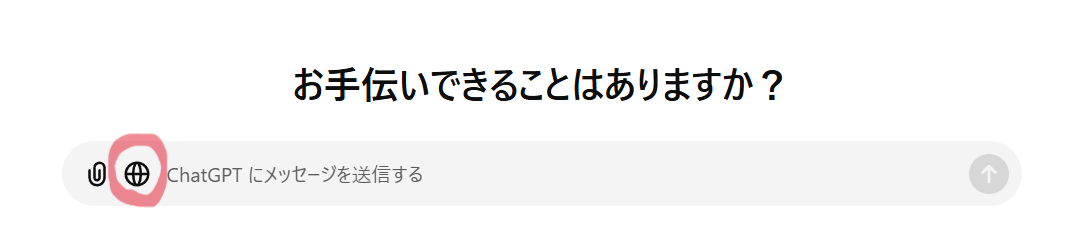


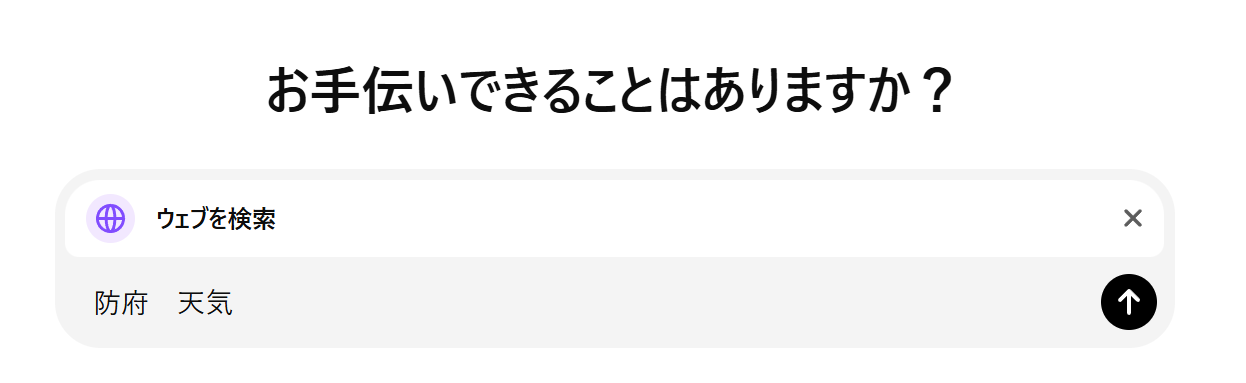
ChatGPTを開くと左のようなページが出てくるかと思います。ChatGPT Searchを使う時は、地球儀（赤まるで囲っているとこ）をクリックして下さい。


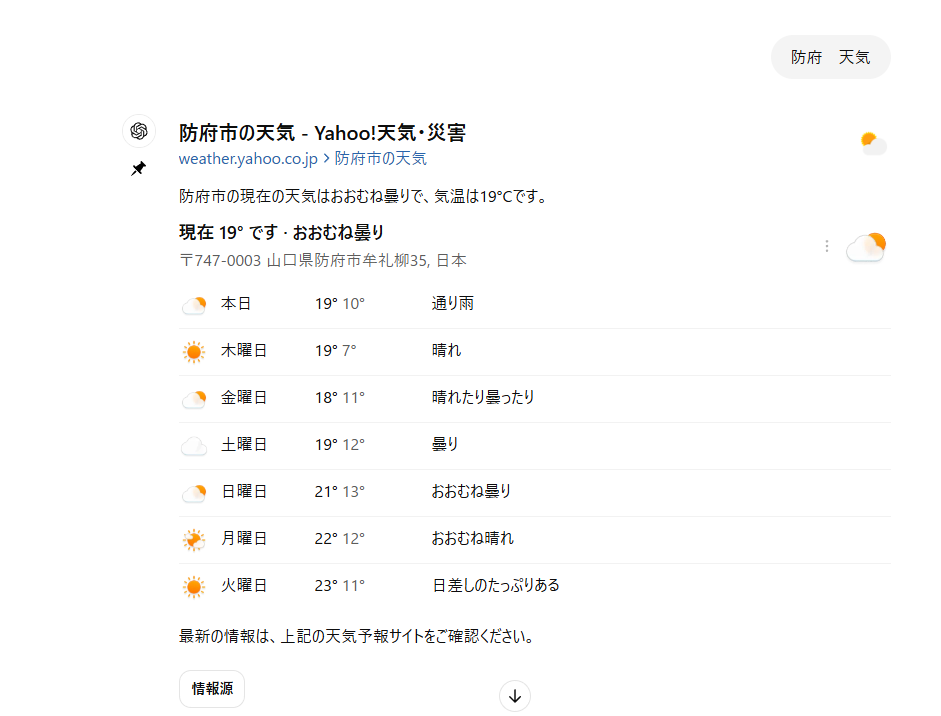
地球儀をクリックすると、検索ボックスが出てきます。そこに、検索したいキーワードを入力して下さい。今回は、「防府　天気」と入力してみました！


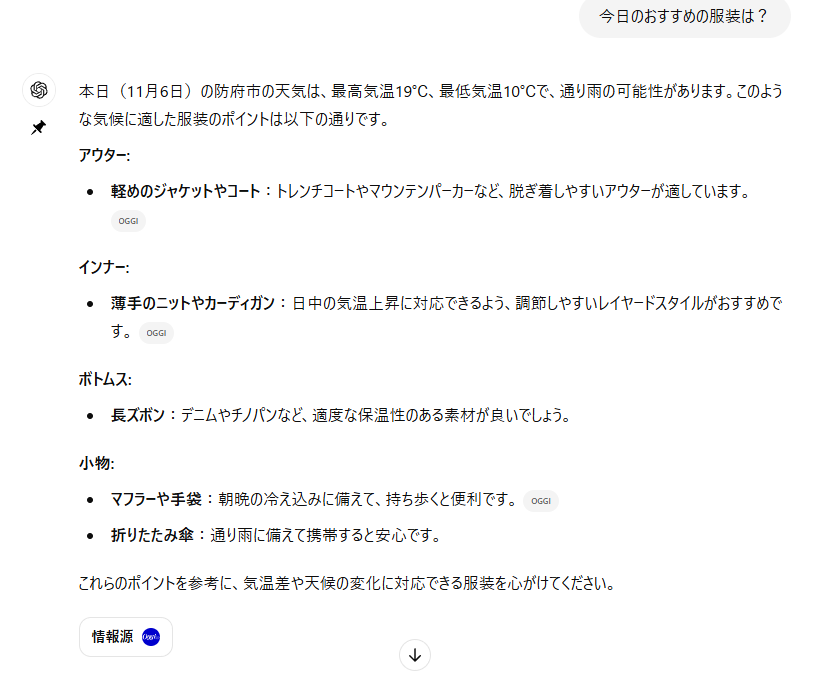
検索してみると、上記のように今日の防府市の天気を教えてくれました！今日の天気が分かったので、「今日のおすすめの服装は？」と聞いてみました。すると・・・以下のようにおすすめの服装を教えてくれました。


ChatGPT Searchで検索をすると、必要な情報や欲しい情報が一目で分かる形で表示されるので、リンクをいくつもクリックして回らなくてもよいので効率的に思えます！また、ChatGPTの機能を利用して対話するような形で継続して質問をしていくこともできるので、便利ですね♪


</description>
<dc:creator></dc:creator>
<dc:subject></dc:subject>
<dc:date>2024-11-06T13:20:00+09:00</dc:date>
<content:encoded><![CDATA[
<div id="cms-editor-minieditor-sin173086690803081200" class="cms-content-parts-sin173086690803089000"><p>インターネットで情報を調べるとき、通常の検索エンジンではリンクをたくさん見て、さらにその中から必要な情報を探す作業が必要ですよね。でも、ChatGPT Searchなら、必要な情報がダイレクトに表示され、効率よく知りたい答えにたどり着けるんです♪</p></div><h3 class="cms-content-parts-sin173086747231017300" id="cms-editor-textarea-sin173086747231021200">ChatGPT Searchとは？</h3><div class="cms-content-parts-sin173086751351051100 cparts-id119 lay-margin-b--3 box" data-selectable="cparts-animate cparts-animate--slideInUp:上へスライド,cparts-animate cparts-animate--slideInDown:下へスライド,cparts-animate cparts-animate--slideInLeft:左へスライド,cparts-animate cparts-animate--slideInRight:右へスライド">
<div class="lay-row">
<div class="lay-col12-xs-12 lay-col12-md-12 lay-col12-lg-12">
<div class="cparts-txt-block lay-reset-child" id="cms-editor-minieditor-sin173086751351088200"><p>ChatGPT Searchは、OpenAIのAIであるChatGPTに質問を入力するだけで、知りたい情報をAIが自然な文章で回答してくれる機能です。</p></div>
</div>
</div>
</div><h3 class="cms-content-parts-sin173086758597944100" id="cms-editor-textarea-sin173086758597952500">ChatGPT Searchの使い方</h3><div class="cms-content-parts-sin173086785521910900 cparts-id119 lay-margin-b--3 box" data-selectable="cparts-animate cparts-animate--slideInUp:上へスライド,cparts-animate cparts-animate--slideInDown:下へスライド,cparts-animate cparts-animate--slideInLeft:左へスライド,cparts-animate cparts-animate--slideInRight:右へスライド">
<div class="lay-row">
<div class="lay-col12-xs-12 lay-col12-md-12 lay-col12-lg-12">
<div class="cparts-txt-block lay-reset-child" id="cms-editor-minieditor-sin173086785521915100"><p>使い方はとても簡単。検索ボックスに質問や調べたい内容を入力するだけでOKです。</p></div>
</div>
</div>
</div><div class="cms-content-parts-sin173086801822647200 box cparts-id437--01 lay-margin-b--3" col-flex="1-2" data-selectable="cparts-animate cparts-animate--slideInUp:上へスライド,cparts-animate cparts-animate--slideInDown:下へスライド,cparts-animate cparts-animate--slideInLeft:左へスライド,cparts-animate cparts-animate--slideInRight:右へスライド">
<div class="lay-row">
<div class="cparts-img-block lay-img-width--max lay-col12-xs-12 lay-col12-md-6 lay-col12-lg-6"><img alt="スクリーンショット 2024-11-06 133344" class="cms-easy-edit" id="cms-editor-image-sin173086801822573500" src="https://www.kurakazu.com/images/blog/images2024110613412833.png" width="330" /></div>

<div class="lay-col12-xs-12 lay-col12-md-6 lay-col12-lg-6">
<div class="cparts-txt-block lay-reset-child" id="cms-editor-minieditor-sin173086801822604100"><p>ChatGPTを開くと左のようなページが出てくるかと思います。</p><p>ChatGPT Searchを使う時は、地球儀（赤まるで囲っているとこ）をクリックして下さい。</p></div>
</div>
</div>
</div><div class="cms-content-parts-sin173086820779514100 box cparts-id437--01 lay-margin-b--3" col-flex="1-2" data-selectable="cparts-animate cparts-animate--slideInUp:上へスライド,cparts-animate cparts-animate--slideInDown:下へスライド,cparts-animate cparts-animate--slideInLeft:左へスライド,cparts-animate cparts-animate--slideInRight:右へスライド">
<div class="lay-row">
<div class="lay-col12-xs-12 lay-col12-md-6 lay-col12-lg-6">
<div class="cparts-txt-block lay-reset-child" id="cms-editor-minieditor-sin173086820779518100"><p>地球儀をクリックすると、検索ボックスが出てきます。</p><p>そこに、検索したいキーワードを入力して下さい。</p><p>今回は、「防府　天気」と入力してみました！</p></div>
</div>

<div class="cparts-img-block lay-img-width--max lay-col12-xs-12 lay-col12-md-6 lay-col12-lg-6"><img alt="スクリーンショット 2024-11-06 134436" class="cms-easy-edit" id="cms-editor-image-sin173086820779518500" src="https://www.kurakazu.com/images/blog/images2024110613445564.png" width="330" /></div>
</div>
</div>
<div class="cms-content-parts-sin173086848091566300 box cparts-id403--01 lay-margin-b--3" data-selectable="cparts-animate cparts-animate--slideInUp:上へスライド,cparts-animate cparts-animate--slideInDown:下へスライド,cparts-animate cparts-animate--slideInLeft:左へスライド,cparts-animate cparts-animate--slideInRight:右へスライド">
<div class="lay-row">
<div class="cparts-img-block lay-img-width--max lay-col12-xs-12"><img alt="" class="cms-easy-edit" id="cms-editor-image-sin173086848091510800" src="https://www.kurakazu.com/images/blog/images2024110613474616.png" width="675" /></div>
</div>
</div><div class="cms-content-parts-sin173086856578296800 cparts-id119 lay-margin-b--3 box" data-selectable="cparts-animate cparts-animate--slideInUp:上へスライド,cparts-animate cparts-animate--slideInDown:下へスライド,cparts-animate cparts-animate--slideInLeft:左へスライド,cparts-animate cparts-animate--slideInRight:右へスライド">
<div class="lay-row">
<div class="lay-col12-xs-12 lay-col12-md-12 lay-col12-lg-12">
<div class="cparts-txt-block lay-reset-child" id="cms-editor-minieditor-sin173086856578307400"><p>検索してみると、上記のように今日の防府市の天気を教えてくれました！</p><p>今日の天気が分かったので、「今日のおすすめの服装は？」と聞いてみました。</p><p>すると・・・</p><p>以下のようにおすすめの服装を教えてくれました。</p></div>
</div>
</div>
</div><div class="cms-content-parts-sin173086880438802300 box cparts-id403--01 lay-margin-b--3" data-selectable="cparts-animate cparts-animate--slideInUp:上へスライド,cparts-animate cparts-animate--slideInDown:下へスライド,cparts-animate cparts-animate--slideInLeft:左へスライド,cparts-animate cparts-animate--slideInRight:右へスライド">
<div class="lay-row">
<div class="cparts-img-block lay-img-width--max lay-col12-xs-12"><img alt="スクリーンショット 2024-11-06 135231" class="cms-easy-edit" id="cms-editor-image-sin173086880438806500" src="https://www.kurakazu.com/images/blog/images2024110613533625.png" width="675" /></div>
</div>
</div><div class="cms-content-parts-sin173086883300015300 cparts-id119 lay-margin-b--3 box" data-selectable="cparts-animate cparts-animate--slideInUp:上へスライド,cparts-animate cparts-animate--slideInDown:下へスライド,cparts-animate cparts-animate--slideInLeft:左へスライド,cparts-animate cparts-animate--slideInRight:右へスライド">
<div class="lay-row">
<div class="lay-col12-xs-12 lay-col12-md-12 lay-col12-lg-12">
<div class="cparts-txt-block lay-reset-child" id="cms-editor-minieditor-sin173086883299992400"><p>ChatGPT Searchで検索をすると、必要な情報や欲しい情報が一目で分かる形で表示されるので、<span style="font-size: 1rem;">リンクをいくつもクリックして回らなくてもよいので効率的に思えます！</span></p><p>また、ChatGPTの機能を利用して対話するような形で継続して質問をしていくこともできるので、便利ですね♪</p><p></p><p></p></div>
</div>
</div>
</div>
]]></content:encoded>
</item>

<item rdf:about="https://www.kurakazu.com/blog/2024/10/14896/">
<title>Amazonや楽天詐欺に騙されない！見抜く7つのポイント</title>
<link>https://www.kurakazu.com/blog/2024/10/14896/</link>
<description>


インターネットでのショッピングは、私たちの日常生活に欠かせないものとなっていますが、最近、Amazonや楽天などの大手ショッピングサイトを装った詐欺が巧妙化しています。これらのフィッシングメールや偽サイトは、一見すると正規のものと区別がつかないほど精巧に作られているため、多くの人が被害に遭う可能性があります。そこで、詐欺から身を守るために注意すべき7つのポイントを解説します。


①送信元のメールアドレスをチェック


正規の企業からのメールは、必ず公式ドメインを使用しています。例えば、Amazonからのメールなら @amazon.co.jp、楽天なら @rakuten.co.jp が基本です。これと似たような偽ドメインが使われる場合があるので、注意深く確認しましょう。


楽天の正規メールアドレス&#8594;ここから参照


②リンク先のURLを確認


メールに記載されているリンクにカーソルを合わせると、実際のURLが表示されます。このURLをしっかり確認して、正規のサイトかどうか見極めましょう。不審なURLや見慣れないドメインの場合はクリックしないことが大切です。


③「急いで行動しろ」というメッセージに警戒


詐欺メールでは、アカウントのロックや支払いの期限など、急いで対応を促すメッセージが多く見られます。こうした緊急性を感じさせる内容に心当たりがない場合は、冷静に正規のサイトにログインして確認するのがベストです。


④個人情報の要求には絶対に応じない


正規の企業がメールでパスワードやクレジットカード情報を要求することはありません。メールやリンク先で個人情報の入力を求められた場合は、詐欺の可能性が非常に高いです。


⑤メールの内容をよく読み、不自然な日本語に注意


詐欺メールには、機械翻訳による不自然な日本語や誤字が含まれていることがよくあります。正規の企業が送るメールには、こうした言語的なミスはほとんど見られません。


⑥注文履歴と照合


「注文確認」などのメールが届いた場合、実際に自分が注文した商品なのかを必ず確認しましょう。心当たりのない注文に関するメールは、公式サイトに直接ログインして確認することで、詐欺メールかどうかを判断できます。


⑦添付ファイルや不審なリンクを開かない


詐欺メールには、ウイルスが含まれたファイルやフィッシングサイトへのリンクが添付されていることがあります。怪しいメールの添付ファイルは開かず、リンクもクリックしないようにしましょう。


これらのポイントを日常的に意識することで、詐欺に引っかかるリスクを大幅に減らすことができます。もし不安なメールを受け取った場合は、決して急いで行動せず、冷静に判断することが重要です。詐欺メールの見抜き方を知っておくことで、安心してインターネットショッピングを楽しむことができますね。


</description>
<dc:creator></dc:creator>
<dc:subject></dc:subject>
<dc:date>2024-10-22T13:20:00+09:00</dc:date>
<content:encoded><![CDATA[
<div class="cms-content-parts-sin172957306623018600 box cparts-id437--01 lay-margin-b--3" col-flex="1-2" data-selectable="cparts-animate cparts-animate--slideInUp:上へスライド,cparts-animate cparts-animate--slideInDown:下へスライド,cparts-animate cparts-animate--slideInLeft:左へスライド,cparts-animate cparts-animate--slideInRight:右へスライド">
<div class="lay-row">
<div class="lay-col12-xs-12 lay-col12-md-6 lay-col12-lg-6">
<div class="cparts-txt-block lay-reset-child" id="cms-editor-minieditor-sin172957306623031100"><p>インターネットでのショッピングは、私たちの日常生活に欠かせないものとなっていますが、最近、Amazonや楽天などの大手ショッピングサイトを装った詐欺が巧妙化しています。これらのフィッシングメールや偽サイトは、一見すると正規のものと区別がつかないほど精巧に作られているため、多くの人が被害に遭う可能性があります。<br />そこで、詐欺から身を守るために注意すべき7つのポイントを解説します。</p></div>
</div>

<div class="cparts-img-block lay-img-width--max lay-col12-xs-12 lay-col12-md-6 lay-col12-lg-6"><img alt="フィッシング詐欺に注意" class="cms-easy-edit" id="cms-editor-image-sin172957306623038600" src="https://www.kurakazu.com/images/blog/images2024102213590684.jpg" width="330"  title="" name="" /></div>
</div>
</div>
<h3 class="cms-content-parts-sin172957140472588400" id="cms-editor-textarea-sin172957140472594600">①送信元のメールアドレスをチェック</h3><div class="cms-content-parts-sin172957144057042000 cparts-id119 lay-margin-b--3 box" data-selectable="cparts-animate cparts-animate--slideInUp:上へスライド,cparts-animate cparts-animate--slideInDown:下へスライド,cparts-animate cparts-animate--slideInLeft:左へスライド,cparts-animate cparts-animate--slideInRight:右へスライド">
<div class="lay-row">
<div class="lay-col12-xs-12 lay-col12-md-12 lay-col12-lg-12">
<div class="cparts-txt-block lay-reset-child" id="cms-editor-minieditor-sin172957144057046900"><p>正規の企業からのメールは、必ず公式ドメインを使用しています。例えば、Amazonからのメールなら @amazon.co.jp、楽天なら @rakuten.co.jp が基本です。これと似たような偽ドメインが使われる場合があるので、注意深く確認しましょう。</p></div>
</div>
</div>
</div><div class="cms-content-parts-sin172957241940089800 cparts-id119 lay-margin-b--3 box" data-selectable="cparts-animate cparts-animate--slideInUp:上へスライド,cparts-animate cparts-animate--slideInDown:下へスライド,cparts-animate cparts-animate--slideInLeft:左へスライド,cparts-animate cparts-animate--slideInRight:右へスライド">
<div class="lay-row">
<div class="lay-col12-xs-12 lay-col12-md-12 lay-col12-lg-12">
<div class="cparts-txt-block lay-reset-child" id="cms-editor-minieditor-sin172957241940058900"><p>楽天の正規メールアドレス&#8594;<a href="https://ichiba.faq.rakuten.net/detail/000013315">ここから参照</a></p></div>
</div>
</div>
</div><h3 class="cms-content-parts-sin172957183343677000" id="cms-editor-textarea-sin172957183343685400">②リンク先のURLを確認</h3><div class="cms-content-parts-sin172957183673220600 cparts-id119 lay-margin-b--3 box" data-selectable="cparts-animate cparts-animate--slideInUp:上へスライド,cparts-animate cparts-animate--slideInDown:下へスライド,cparts-animate cparts-animate--slideInLeft:左へスライド,cparts-animate cparts-animate--slideInRight:右へスライド">
<div class="lay-row">
<div class="lay-col12-xs-12 lay-col12-md-12 lay-col12-lg-12">
<div class="cparts-txt-block lay-reset-child" id="cms-editor-minieditor-sin172957183673195500"><p>メールに記載されているリンクにカーソルを合わせると、実際のURLが表示されます。このURLをしっかり確認して、正規のサイトかどうか見極めましょう。不審なURLや見慣れないドメインの場合はクリックしないことが大切です。</p></div>
</div>
</div>
</div><h3 class="cms-content-parts-sin172957187285899200" id="cms-editor-textarea-sin172957187285907600">③「急いで行動しろ」というメッセージに警戒</h3><div class="cms-content-parts-sin172957187907137000 cparts-id119 lay-margin-b--3 box" data-selectable="cparts-animate cparts-animate--slideInUp:上へスライド,cparts-animate cparts-animate--slideInDown:下へスライド,cparts-animate cparts-animate--slideInLeft:左へスライド,cparts-animate cparts-animate--slideInRight:右へスライド">
<div class="lay-row">
<div class="lay-col12-xs-12 lay-col12-md-12 lay-col12-lg-12">
<div class="cparts-txt-block lay-reset-child" id="cms-editor-minieditor-sin172957187907110500"><p>詐欺メールでは、アカウントのロックや支払いの期限など、急いで対応を促すメッセージが多く見られます。こうした緊急性を感じさせる内容に心当たりがない場合は、冷静に正規のサイトにログインして確認するのがベストです。</p></div>
</div>
</div>
</div><h3 class="cms-content-parts-sin172957195793627800" id="cms-editor-textarea-sin172957195793636200">④個人情報の要求には絶対に応じない</h3><div class="cms-content-parts-sin172957196068057500 cparts-id119 lay-margin-b--3 box" data-selectable="cparts-animate cparts-animate--slideInUp:上へスライド,cparts-animate cparts-animate--slideInDown:下へスライド,cparts-animate cparts-animate--slideInLeft:左へスライド,cparts-animate cparts-animate--slideInRight:右へスライド">
<div class="lay-row">
<div class="lay-col12-xs-12 lay-col12-md-12 lay-col12-lg-12">
<div class="cparts-txt-block lay-reset-child" id="cms-editor-minieditor-sin172957196068016500"><p>正規の企業がメールでパスワードやクレジットカード情報を要求することはありません。メールやリンク先で個人情報の入力を求められた場合は、詐欺の可能性が非常に高いです。</p></div>
</div>
</div>
</div><h3 class="cms-content-parts-sin172957199593396300" id="cms-editor-textarea-sin172957199593404600">⑤メールの内容をよく読み、不自然な日本語に注意</h3><div class="cms-content-parts-sin172957199863513100 cparts-id119 lay-margin-b--3 box" data-selectable="cparts-animate cparts-animate--slideInUp:上へスライド,cparts-animate cparts-animate--slideInDown:下へスライド,cparts-animate cparts-animate--slideInLeft:左へスライド,cparts-animate cparts-animate--slideInRight:右へスライド">
<div class="lay-row">
<div class="lay-col12-xs-12 lay-col12-md-12 lay-col12-lg-12">
<div class="cparts-txt-block lay-reset-child" id="cms-editor-minieditor-sin172957199863489500"><p>詐欺メールには、機械翻訳による不自然な日本語や誤字が含まれていることがよくあります。正規の企業が送るメールには、こうした言語的なミスはほとんど見られません。</p></div>
</div>
</div>
</div><h3 class="cms-content-parts-sin172957204368009300" id="cms-editor-textarea-sin172957204368017600">⑥注文履歴と照合</h3><div class="cms-content-parts-sin172957204695918800 cparts-id119 lay-margin-b--3 box" data-selectable="cparts-animate cparts-animate--slideInUp:上へスライド,cparts-animate cparts-animate--slideInDown:下へスライド,cparts-animate cparts-animate--slideInLeft:左へスライド,cparts-animate cparts-animate--slideInRight:右へスライド">
<div class="lay-row">
<div class="lay-col12-xs-12 lay-col12-md-12 lay-col12-lg-12">
<div class="cparts-txt-block lay-reset-child" id="cms-editor-minieditor-sin172957204695890600"><p>「注文確認」などのメールが届いた場合、実際に自分が注文した商品なのかを必ず確認しましょう。心当たりのない注文に関するメールは、公式サイトに直接ログインして確認することで、詐欺メールかどうかを判断できます。</p></div>
</div>
</div>
</div><h3 class="cms-content-parts-sin172957212777500100" id="cms-editor-textarea-sin172957212777509300">⑦添付ファイルや不審なリンクを開かない</h3><div class="cms-content-parts-sin172957213040166500 cparts-id119 lay-margin-b--3 box" data-selectable="cparts-animate cparts-animate--slideInUp:上へスライド,cparts-animate cparts-animate--slideInDown:下へスライド,cparts-animate cparts-animate--slideInLeft:左へスライド,cparts-animate cparts-animate--slideInRight:右へスライド">
<div class="lay-row">
<div class="lay-col12-xs-12 lay-col12-md-12 lay-col12-lg-12">
<div class="cparts-txt-block lay-reset-child" id="cms-editor-minieditor-sin172957213040134800"><p>詐欺メールには、ウイルスが含まれたファイルやフィッシングサイトへのリンクが添付されていることがあります。怪しいメールの添付ファイルは開かず、リンクもクリックしないようにしましょう。</p></div>
</div>
</div>
</div><div class="cms-content-parts-sin172957218785572200 cparts-id119 lay-margin-b--3 box" data-selectable="cparts-animate cparts-animate--slideInUp:上へスライド,cparts-animate cparts-animate--slideInDown:下へスライド,cparts-animate cparts-animate--slideInLeft:左へスライド,cparts-animate cparts-animate--slideInRight:右へスライド">
<div class="lay-row">
<div class="lay-col12-xs-12 lay-col12-md-12 lay-col12-lg-12">
<div class="cparts-txt-block lay-reset-child" id="cms-editor-minieditor-sin172957218785576300"><p>これらのポイントを日常的に意識することで、詐欺に引っかかるリスクを大幅に減らすことができます。もし不安なメールを受け取った場合は、決して急いで行動せず、冷静に判断することが重要です。</p><p>詐欺メールの見抜き方を知っておくことで、安心してインターネットショッピングを楽しむことができますね。</p></div>
</div>
</div>
</div>
]]></content:encoded>
</item>

<item rdf:about="https://www.kurakazu.com/blog/2024/09/14894/">
<title>生成AI,ChatGPT4o（愛称チャッピー）の進化は凄まじい。</title>
<link>https://www.kurakazu.com/blog/2024/09/14894/</link>
<description>


お客様と話していて、頭の中にワクワクとアイディアが、「それ、チャッピーでできるんじゃね？」という事で、ミーティングでアイディア出し。おそらく顧客管理システムをChatGPTに作らせるというすご技、おまけにキーボード弱者の高齢美容師さんに、スマホのチャッピーで販売管理and顧客管理ってすごくないですか？顧客台帳をスマホで持ち歩き、気になる顧客の動向とか、売上とかなんなら、この〇〇さんに電話して、とかDM出しといて、なんて「頼むだけで事足りる」時代がもうすぐです。(^^♪


</description>
<dc:creator></dc:creator>
<dc:subject></dc:subject>
<dc:date>2024-09-28T13:50:00+09:00</dc:date>
<content:encoded><![CDATA[
<div class="cms-content-parts-sin172836333487332100 box cparts-id437--01 lay-margin-b--3" col-flex="1-2" data-selectable="cparts-animate cparts-animate--slideInUp:上へスライド,cparts-animate cparts-animate--slideInDown:下へスライド,cparts-animate cparts-animate--slideInLeft:左へスライド,cparts-animate cparts-animate--slideInRight:右へスライド">
<div class="lay-row">
<div class="cparts-img-block lay-img-width--max lay-col12-xs-12 lay-col12-md-6 lay-col12-lg-6"><img alt="" class="cms-easy-edit" id="cms-editor-image-sin172836333487316000" src="https://www.kurakazu.com/images/blog/461416972_952174386931501_6485597808011877919_n.jpg" width="330" /></div>

<div class="lay-col12-xs-12 lay-col12-md-6 lay-col12-lg-6">
<div class="cparts-txt-block lay-reset-child" id="cms-editor-minieditor-sin172836333487342200"><p>お客様と話していて、頭の中にワクワクとアイディアが、「それ、チャッピーでできるんじゃね？」という事で、ミーティングでアイディア出し。</p><p>おそらく顧客管理システムをChatGPTに作らせるというすご技、おまけにキーボード弱者の高齢美容師さんに、スマホのチャッピーで販売管理and顧客管理ってすごくないですか？</p><p>顧客台帳をスマホで持ち歩き、気になる顧客の動向とか、売上とかなんなら、この〇〇さんに電話して、とかDM出しといて、なんて「頼むだけで事足りる」時代がもうすぐです。(^^♪</p></div>
</div>
</div>
</div>

]]></content:encoded>
</item>

<item rdf:about="https://www.kurakazu.com/blog/2024/09/14893/">
<title>半導体業界でもAIは最重要トピックスです。</title>
<link>https://www.kurakazu.com/blog/2024/09/14893/</link>
<description>IntelやAMDなどが新しいプロセッサを発表しており、特にIntelの「Lunar Lake」プロセッサは、AI処理の強化と効率性の向上が注目されています。これにより、超薄型ノートPCでのパフォーマンスがさらに向上すると期待されています​。12月頃に国内各社から発売予定の、co-pilot PC はCPU内にAIを組み込むよていなので、ネットを介さなくてもAIが使えます。つまり、公にできない「自社の重要な機微情報」を元に、自社のマーケティングや販売戦略、新事業進出へのアイディア、事業計画などをスタンドアロンPCで考えさせることが出来るようになります。これは企業にとってとてもハッピーなニュースですね。(^^♪


</description>
<dc:creator></dc:creator>
<dc:subject></dc:subject>
<dc:date>2024-09-21T13:45:00+09:00</dc:date>
<content:encoded><![CDATA[
<div id="cms-editor-minieditor-sin172836300730480300" class="cms-content-parts-sin172836300730488500"><div class="xdj266r x11i5rnm xat24cr x1mh8g0r x1vvkbs x126k92a" style="margin: 0px; overflow-wrap: break-word; white-space-collapse: preserve; font-family: &#34;Segoe UI Historic&#34;, &#34;Segoe UI&#34;, Helvetica, Arial, &#34;hiragino kaku gothic pro&#34;, meiryo, &#34;ms pgothic&#34;, sans-serif; color: rgb(5, 5, 5); font-size: 15px; background-color: rgb(255, 255, 255);"><p>IntelやAMDなどが新しいプロセッサを発表しており、特にIntelの「Lunar Lake」プロセッサは、AI処理の強化と効率性の向上が注目されています。</p><p>これにより、超薄型ノートPCでのパフォーマンスがさらに向上すると期待されています​。</p></div><div class="x11i5rnm xat24cr x1mh8g0r x1vvkbs xtlvy1s x126k92a" style="margin: 0.5em 0px 0px; overflow-wrap: break-word; white-space-collapse: preserve; font-family: &#34;Segoe UI Historic&#34;, &#34;Segoe UI&#34;, Helvetica, Arial, &#34;hiragino kaku gothic pro&#34;, meiryo, &#34;ms pgothic&#34;, sans-serif; color: rgb(5, 5, 5); font-size: 15px; background-color: rgb(255, 255, 255);"><p>12月頃に国内各社から発売予定の、co-pilot PC はCPU内にAIを組み込むよていなので、ネットを介さなくてもAIが使えます。</p><p>つまり、公にできない「自社の重要な機微情報」を元に、自社のマーケティングや販売戦略、新事業進出へのアイディア、事業計画などをスタンドアロンPCで考えさせることが出来るようになります。</p></div><div class="x11i5rnm xat24cr x1mh8g0r x1vvkbs xtlvy1s x126k92a" style="margin: 0.5em 0px 0px; overflow-wrap: break-word; white-space-collapse: preserve; font-family: &#34;Segoe UI Historic&#34;, &#34;Segoe UI&#34;, Helvetica, Arial, &#34;hiragino kaku gothic pro&#34;, meiryo, &#34;ms pgothic&#34;, sans-serif; color: rgb(5, 5, 5); font-size: 15px; background-color: rgb(255, 255, 255);"><p>これは企業にとってとてもハッピーなニュースですね。(^^♪</p></div></div><div class="cms-content-parts-sin172836310773919200 box cparts-id403--01 lay-margin-b--3" data-selectable="cparts-animate cparts-animate--slideInUp:上へスライド,cparts-animate cparts-animate--slideInDown:下へスライド,cparts-animate cparts-animate--slideInLeft:左へスライド,cparts-animate cparts-animate--slideInRight:右へスライド">
<div class="lay-row">
<div class="cparts-img-block lay-img-width--max lay-col12-xs-12"><img alt="" class="cms-easy-edit" id="cms-editor-image-sin172836310773923300" src="https://www.kurakazu.com/images/blog/461342702_952177496931190_4912138455722808394_n.jpg" width="675" /></div>
</div>
</div>

]]></content:encoded>
</item>

<item rdf:about="https://www.kurakazu.com/blog/2024/09/14892/">
<title>ChatGPTで新規ビジネス</title>
<link>https://www.kurakazu.com/blog/2024/09/14892/</link>
<description>


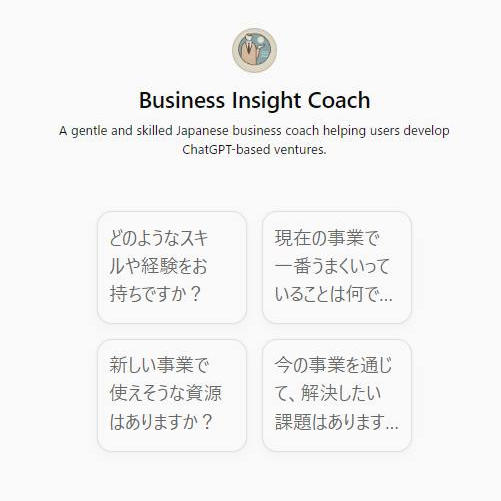
ビジネス・インサイト・コーチ


生成AI、ChatGPTの話題と技術革新が凄まじく、あっという間に幅広い分野で使われ始めました。便利な機能が次々と出てきました。わが社もこの波を受けて、何か新サービスを始めようと、いろいろ考えてみたものの、いまいちピンとこない。そこで、ChatGPTのGPTs機能を使って、ビジネス・インサイト・コーチを育成してみました。


「あなたは日本一優秀な経験豊富なビジネスのコーチです。」と定義して、相談の進め方、アドバイスの質の定義、ふるまい方など様々な要因をルール化して教え、３０分ほどで完成しました。名前はチャッピー（chatGPT）としました。わが社の現状と課題、これからやりたい方向性、理念や価値観などをヒアリングしてもらい、アドバイスをいただきました！(^^♪対話しているうちに、なんだかやる気になってきて「いけるんじゃないか！」とモチベーションが上がって、さすが「日本一のビジネス・インサイト・コーチ」です。(#^.^#)適格なアドバイスに加え、今後の進め方についていろいろ質問して、着手の段取りを決めました。約１時間の対話だったけれど、人間のコーチに相談したら、いくらかかるんだろうか、などと考えました。世の中が大きく変わっていきます。でも、チャッピーがいるから、少し安心です。(^^♪興味がありましたら、ChatGPTの活用方法、お教えいたします。お気軽にお電話ください。特に５０歳以上の方、将来外出がままならなくなった時、ネットや新しい技術を身に着けていれば、何も恐れることはありません。ベッドの上でも人間らしく暮らす。私たちは、そのお手伝いができればと願っています。
</description>
<dc:creator></dc:creator>
<dc:subject></dc:subject>
<dc:date>2024-09-16T13:40:00+09:00</dc:date>
<content:encoded><![CDATA[
<div class="cms-content-parts-sin172836285713532600 box cparts-id409--01 lay-margin-b--3" col-flex="1-2" data-selectable="cparts-animate cparts-animate--slideInUp:上へスライド,cparts-animate cparts-animate--slideInDown:下へスライド,cparts-animate cparts-animate--slideInLeft:左へスライド,cparts-animate cparts-animate--slideInRight:右へスライド">
<div class="lay-row">
<div class="lay-col12-xs-12 lay-col12-md-6 lay-col12-lg-6">
<div class="cparts-img-block lay-img-width--max lay-margin-b--1"><img alt="" class="cms-easy-edit" id="cms-editor-image-sin172836285713518000" src="https://www.kurakazu.com/images/blog/460155433_6599968736504_5758309869875262071_n.jpg" width="330" /></div>

<div class="cparts-caption-block lay-reset-child lay-font-size--s cms-easy-edit" id="cms-editor-minieditor-sin172836285713542600"><p><span style="color: rgb(5, 5, 5); font-family: &#34;Segoe UI Historic&#34;, &#34;Segoe UI&#34;, Helvetica, Arial, &#34;hiragino kaku gothic pro&#34;, meiryo, &#34;ms pgothic&#34;, sans-serif; font-size: 15px; white-space-collapse: preserve;">ビジネス・インサイト・コーチ</span></p></div>
</div>

<div class="lay-col12-xs-12 lay-col12-md-6 lay-col12-lg-6">
<div class="cparts-txt-block lay-reset-child" id="cms-editor-minieditor-sin172836285713550200"><p style="color: rgb(5, 5, 5); font-family: &#34;Segoe UI Historic&#34;, &#34;Segoe UI&#34;, Helvetica, Arial, &#34;hiragino kaku gothic pro&#34;, meiryo, &#34;ms pgothic&#34;, sans-serif; font-size: 15px; white-space-collapse: preserve;">生成AI、ChatGPTの話題と技術革新が凄まじく、あっという間に幅広い分野で使われ始めました。便利な機能が次々と出てきました。</p><p style="color: rgb(5, 5, 5); font-family: &#34;Segoe UI Historic&#34;, &#34;Segoe UI&#34;, Helvetica, Arial, &#34;hiragino kaku gothic pro&#34;, meiryo, &#34;ms pgothic&#34;, sans-serif; font-size: 15px; white-space-collapse: preserve;">わが社もこの波を受けて、何か新サービスを始めようと、いろいろ考えてみたものの、いまいちピンとこない。</p><p style="color: rgb(5, 5, 5); font-family: &#34;Segoe UI Historic&#34;, &#34;Segoe UI&#34;, Helvetica, Arial, &#34;hiragino kaku gothic pro&#34;, meiryo, &#34;ms pgothic&#34;, sans-serif; font-size: 15px; white-space-collapse: preserve;">そこで、ChatGPTのGPTs機能を使って、ビジネス・インサイト・コーチを育成してみました。</p></div>
</div>
</div>
</div>
<div id="cms-editor-minieditor-sin172836271258072400" class="cms-content-parts-sin172836271258081100"><div class="xdj266r x11i5rnm xat24cr x1mh8g0r x1vvkbs x126k92a" style="margin: 0px; overflow-wrap: break-word; white-space-collapse: preserve; font-family: &#34;Segoe UI Historic&#34;, &#34;Segoe UI&#34;, Helvetica, Arial, &#34;hiragino kaku gothic pro&#34;, meiryo, &#34;ms pgothic&#34;, sans-serif; color: rgb(5, 5, 5); font-size: 15px; background-color: rgb(255, 255, 255);"><p>「あなたは日本一優秀な経験豊富なビジネスのコーチです。」と定義して、相談の進め方、アドバイスの質の定義、ふるまい方など様々な要因をルール化して教え、３０分ほどで完成しました。</p></div><div class="x11i5rnm xat24cr x1mh8g0r x1vvkbs xtlvy1s x126k92a" style="margin: 0.5em 0px 0px; overflow-wrap: break-word; white-space-collapse: preserve; font-family: &#34;Segoe UI Historic&#34;, &#34;Segoe UI&#34;, Helvetica, Arial, &#34;hiragino kaku gothic pro&#34;, meiryo, &#34;ms pgothic&#34;, sans-serif; color: rgb(5, 5, 5); font-size: 15px; background-color: rgb(255, 255, 255);"><p>名前はチャッピー（chatGPT）としました。</p><p>わが社の現状と課題、これからやりたい方向性、理念や価値観などをヒアリングしてもらい、アドバイスをいただきました！(^^♪</p></div><div class="x11i5rnm xat24cr x1mh8g0r x1vvkbs xtlvy1s x126k92a" style="margin: 0.5em 0px 0px; overflow-wrap: break-word; white-space-collapse: preserve; font-family: &#34;Segoe UI Historic&#34;, &#34;Segoe UI&#34;, Helvetica, Arial, &#34;hiragino kaku gothic pro&#34;, meiryo, &#34;ms pgothic&#34;, sans-serif; color: rgb(5, 5, 5); font-size: 15px; background-color: rgb(255, 255, 255);"><p>対話しているうちに、なんだかやる気になってきて「いけるんじゃないか！」とモチベーションが上がって、さすが「日本一のビジネス・インサイト・コーチ」です。(#^.^#)</p></div><div class="x11i5rnm xat24cr x1mh8g0r x1vvkbs xtlvy1s x126k92a" style="margin: 0.5em 0px 0px; overflow-wrap: break-word; white-space-collapse: preserve; font-family: &#34;Segoe UI Historic&#34;, &#34;Segoe UI&#34;, Helvetica, Arial, &#34;hiragino kaku gothic pro&#34;, meiryo, &#34;ms pgothic&#34;, sans-serif; color: rgb(5, 5, 5); font-size: 15px; background-color: rgb(255, 255, 255);"><p>適格なアドバイスに加え、今後の進め方についていろいろ質問して、着手の段取りを決めました。</p><p>約１時間の対話だったけれど、人間のコーチに相談したら、いくらかかるんだろうか、などと考えました。</p></div><div class="x11i5rnm xat24cr x1mh8g0r x1vvkbs xtlvy1s x126k92a" style="margin: 0.5em 0px 0px; overflow-wrap: break-word; white-space-collapse: preserve; font-family: &#34;Segoe UI Historic&#34;, &#34;Segoe UI&#34;, Helvetica, Arial, &#34;hiragino kaku gothic pro&#34;, meiryo, &#34;ms pgothic&#34;, sans-serif; color: rgb(5, 5, 5); font-size: 15px; background-color: rgb(255, 255, 255);"><p>世の中が大きく変わっていきます。</p><p>でも、チャッピーがいるから、少し安心です。(^^♪</p></div><div class="x11i5rnm xat24cr x1mh8g0r x1vvkbs xtlvy1s x126k92a" style="margin: 0.5em 0px 0px; overflow-wrap: break-word; white-space-collapse: preserve; font-family: &#34;Segoe UI Historic&#34;, &#34;Segoe UI&#34;, Helvetica, Arial, &#34;hiragino kaku gothic pro&#34;, meiryo, &#34;ms pgothic&#34;, sans-serif; color: rgb(5, 5, 5); font-size: 15px; background-color: rgb(255, 255, 255);"><p>興味がありましたら、ChatGPTの活用方法、お教えいたします。</p><p>お気軽にお電話ください。</p><p>特に５０歳以上の方、将来外出がままならなくなった時、ネットや新しい技術を身に着けていれば、何も恐れることはありません。</p><p>ベッドの上でも人間らしく暮らす。</p><p>私たちは、そのお手伝いができればと願っています。</p></div></div>

]]></content:encoded>
</item>

<item rdf:about="https://www.kurakazu.com/blog/2024/09/14891/">
<title>Cookieとキャッシュ</title>
<link>https://www.kurakazu.com/blog/2024/09/14891/</link>
<description>Webサイトを開くと「Cookieを許可しますか？」と聞かれる事が多くなりました。Cookieを使うと、私たちは一度訪問したサイトに再びログインするとき、個人情報などを再度入れなくてもよくなります。　その代わりにCookieが不正な方法で利用されると、個人情報の侵害（情報の流出）となる可能性もあります。そのため後でトラブルにならないようにWebサイト運営者は同意を取るのです。　何か起きた時「あなたが許可したんですよ」という言質をとるためかもしれません。では、許可しなかったらどうなるでしょうか。また来た時に再度IDやPWを入れる事になります。　つまり、また来るなら「許可しても良い」でしょうが、二度と来ないなら「許可しない」で問題ありません。つまり、そういうこと。　よく似た「キャッシュ」と区別して覚えておきましょう。・Cookie：以前利用したWebサイトでのログイン、個人情報の入力を不要にする・キャッシュ：以前利用したWebサイトに再度アクセスした際の表示をスムーズにする</description>
<dc:creator></dc:creator>
<dc:subject></dc:subject>
<dc:date>2024-09-07T13:40:00+09:00</dc:date>
<content:encoded><![CDATA[
<div id="cms-editor-minieditor-sin172836251337613000" class="cms-content-parts-sin172836251337620100"><div class="x11i5rnm xat24cr x1mh8g0r x1vvkbs xtlvy1s x126k92a" style="margin: 0.5em 0px 0px; overflow-wrap: break-word; white-space-collapse: preserve; font-family: &#34;Segoe UI Historic&#34;, &#34;Segoe UI&#34;, Helvetica, Arial, &#34;hiragino kaku gothic pro&#34;, meiryo, &#34;ms pgothic&#34;, sans-serif; color: rgb(5, 5, 5); font-size: 15px; background-color: rgb(255, 255, 255);"><p>Webサイトを開くと「Cookieを許可しますか？」と聞かれる事が多くなりました。Cookieを使うと、私たちは一度訪問したサイトに再びログインするとき、個人情報などを再度入れなくてもよくなります。</p><p>　その代わりにCookieが不正な方法で利用されると、個人情報の侵害（情報の流出）となる可能性もあります。そのため後でトラブルにならないようにWebサイト運営者は同意を取るのです。</p></div><div class="x11i5rnm xat24cr x1mh8g0r x1vvkbs xtlvy1s x126k92a" style="margin: 0.5em 0px 0px; overflow-wrap: break-word; white-space-collapse: preserve; font-family: &#34;Segoe UI Historic&#34;, &#34;Segoe UI&#34;, Helvetica, Arial, &#34;hiragino kaku gothic pro&#34;, meiryo, &#34;ms pgothic&#34;, sans-serif; color: rgb(5, 5, 5); font-size: 15px; background-color: rgb(255, 255, 255);"><p>　何か起きた時「あなたが許可したんですよ」という言質をとるためかもしれません。では、許可しなかったらどうなるでしょうか。また来た時に再度IDやPWを入れる事になります。</p><p>　つまり、また来るなら「許可しても良い」でしょうが、二度と来ないなら「許可しない」で問題ありません。つまり、そういうこと。</p><p>　よく似た「キャッシュ」と区別して覚えておきましょう。</p></div><div class="x11i5rnm xat24cr x1mh8g0r x1vvkbs xtlvy1s x126k92a" style="margin: 0.5em 0px 0px; overflow-wrap: break-word; white-space-collapse: preserve; font-family: &#34;Segoe UI Historic&#34;, &#34;Segoe UI&#34;, Helvetica, Arial, &#34;hiragino kaku gothic pro&#34;, meiryo, &#34;ms pgothic&#34;, sans-serif; color: rgb(5, 5, 5); font-size: 15px; background-color: rgb(255, 255, 255);"><p>・Cookie：以前利用したWebサイトでのログイン、個人情報の入力を不要にする</p><p>・キャッシュ：以前利用したWebサイトに再度アクセスした際の表示をスムーズにする</p></div></div>
]]></content:encoded>
</item>

<item rdf:about="https://www.kurakazu.com/blog/2024/08/14890/">
<title>アカウントやパスワードの管理方法についてアドバイス</title>
<link>https://www.kurakazu.com/blog/2024/08/14890/</link>
<description>パソコンでインターネットやwebサービスを利用していると、アカウントやパスワードといった聞き慣れない言葉が出てきます。皆さんこういった聞いたことのない単語が出てくると、自分の事と無関係な事だと思ってしまい管理が疎かになります。「アカウント」というのは、そのサービスを受ける時の会員カードみたいなもの。パスワードというのは暗証番号です。インターネットサービスはアカウントとパスワードがないと利用できない事が多いです。そんな大切なアカウントやパスワードですが、結構皆さん管理が出来ていない人が多く、助けを求めて駆け込んでくる人がチラホラ。そこで、管理方法についていくつかご提案するので、ご参考にされてください自分ルールを作っておく（IDは固定、パスワードは数種類の中で使いまわす等）パスワード帳という紙のメモ帳を活用する（1,000円くらいで売っています）パソコンのパスワード保存機能を活用する（保存できないこともあります）2番について、普通のメモ帳で管理されている方は、どこに記録したかわからなくなりがちです。パスワード帳というのも売っているので、ご参考にされてください。</description>
<dc:creator></dc:creator>
<dc:subject></dc:subject>
<dc:date>2024-08-31T13:35:00+09:00</dc:date>
<content:encoded><![CDATA[
<div id="cms-editor-minieditor-sin172836244325275400" class="cms-content-parts-sin172836244325283600"><p>パソコンでインターネットやwebサービスを利用していると、アカウントやパスワードといった聞き慣れない言葉が出てきます。皆さんこういった聞いたことのない単語が出てくると、自分の事と無関係な事だと思ってしまい管理が疎かになります。</p><p>「アカウント」というのは、そのサービスを受ける時の会員カードみたいなもの。パスワードというのは暗証番号です。</p><p>インターネットサービスはアカウントとパスワードがないと利用できない事が多いです。</p><p>そんな大切なアカウントやパスワードですが、結構皆さん管理が出来ていない人が多く、助けを求めて駆け込んでくる人がチラホラ。そこで、管理方法についていくつかご提案するので、ご参考にされてください</p><ol><li>自分ルールを作っておく（IDは固定、パスワードは数種類の中で使いまわす等）</li><li>パスワード帳という紙のメモ帳を活用する（1,000円くらいで売っています）</li><li>パソコンのパスワード保存機能を活用する（保存できないこともあります）</li></ol><p>2番について、普通のメモ帳で管理されている方は、どこに記録したかわからなくなりがちです。パスワード帳というのも売っているので、ご参考にされてください。</p></div>
]]></content:encoded>
</item>

<item rdf:about="https://www.kurakazu.com/blog/2024/08/14889/">
<title>暮らしに役立つアプリ</title>
<link>https://www.kurakazu.com/blog/2024/08/14889/</link>
<description>yahoo防災速報


地震や大雨の情報をすぐに教えてくれる無料のアプリです。スマホに入れておくと、緊急地震速報などの情報を即座に受け取れます。アプリには、災害時に役立つ情報をまとめた「手帳」や、避難場所を登録できる機能、ハザードマップの確認ができる機能があります。また、家族の人数やペットの有無を入力すると、1週間分の備蓄の目安を簡単に知ることができます。自宅や職場など、最大3つの場所の防災情報を登録しておけるので、離れた場所の状況も把握できます。


全国避難所ガイド


災害が起きたときに今いる場所から一番近い避難所を探してくれるアプリです。外出先でも近くの避難所が分かり、避難所までの道順も案内してくれるので便利です。また、インターネットが使えない状況でも、避難所の場所や地図がスマホに保存されているので見ることができます。


</description>
<dc:creator></dc:creator>
<dc:subject></dc:subject>
<dc:date>2024-08-23T13:25:00+09:00</dc:date>
<content:encoded><![CDATA[
<h4 class="cms-content-parts-sin172836175752882300" id="cms-editor-textarea-sin172836175752894200">yahoo防災速報</h4><div class="cms-content-parts-sin172836189241336800 cparts-id119 lay-margin-b--3 box" data-selectable="cparts-animate cparts-animate--slideInUp:上へスライド,cparts-animate cparts-animate--slideInDown:下へスライド,cparts-animate cparts-animate--slideInLeft:左へスライド,cparts-animate cparts-animate--slideInRight:右へスライド">
<div class="lay-row">
<div class="lay-col12-xs-12 lay-col12-md-12 lay-col12-lg-12">
<div class="cparts-txt-block lay-reset-child" id="cms-editor-minieditor-sin172836189241340700"><p>地震や大雨の情報をすぐに教えてくれる無料のアプリです。スマホに入れておくと、緊急地震速報などの情報を即座に受け取れます。アプリには、災害時に役立つ情報をまとめた「手帳」や、避難場所を登録できる機能、ハザードマップの確認ができる機能があります。また、家族の人数やペットの有無を入力すると、1週間分の備蓄の目安を簡単に知ることができます。自宅や職場など、最大3つの場所の防災情報を登録しておけるので、離れた場所の状況も把握できます。</p></div>
</div>
</div>
</div><h4 class="cms-content-parts-sin172836211317294200" id="cms-editor-textarea-sin172836211317302600">全国避難所ガイド</h4><div class="cms-content-parts-sin172836214091526700 cparts-id119 lay-margin-b--3 box" data-selectable="cparts-animate cparts-animate--slideInUp:上へスライド,cparts-animate cparts-animate--slideInDown:下へスライド,cparts-animate cparts-animate--slideInLeft:左へスライド,cparts-animate cparts-animate--slideInRight:右へスライド">
<div class="lay-row">
<div class="lay-col12-xs-12 lay-col12-md-12 lay-col12-lg-12">
<div class="cparts-txt-block lay-reset-child" id="cms-editor-minieditor-sin172836214091472900"><p>災害が起きたときに今いる場所から一番近い避難所を探してくれるアプリです。外出先でも近くの避難所が分かり、避難所までの道順も案内してくれるので便利です。また、インターネットが使えない状況でも、避難所の場所や地図がスマホに保存されているので見ることができます。</p></div>
</div>
</div>
</div>
]]></content:encoded>
</item>

<item rdf:about="https://www.kurakazu.com/blog/2024/08/14888/">
<title>Chatgptの衝撃</title>
<link>https://www.kurakazu.com/blog/2024/08/14888/</link>
<description>35年前パソコンがこれからの世の中を変える予感がしました。事実仕事のやり方が大きく変わりました。インターネットが登場すると、もうパソコンは計算機ではない。通信機だと感じました。情報共有が驚異的に加速されました。Webサイトで物販が始まったら、私たちの暮らしは大きく変わり、SNSの登場で私たちの意識が大変革を起こしました。そして、生成AIの登場です。35年前と同じ繰り返し。「おもちゃがあっという間に世界を駆逐する」感覚。それも確実に巨大化しています。生成AIはいわば、超優秀で従順な秘書がいつでもそばにいてくれる感じ。何をさせるかはあなた次第。具体的には次のようなことが可能です。①物事の作業速度が3～10倍になる。考える速度、仕事をする速度、探す速度、何かを作成する速度、それらが確実に高速化されます。空いた時間に何をします？(^^♪②「高品質」な結果を得られます。自分一人では思いつかなかった「鋭い切り口」「視点」「分析力」すべてがハイクオリティなコンテンツを生み出せます。③情報収集と結果のレポートを簡単に。膨大な情報の中から、「自分が集めたいものを厳選して集めてくれる」優秀な秘書を手に入れられます。④発想力、創造力まで拡張されます。生成AIとのスリリングな対話は、あなたのイマジネーションを最大限に引き出すことでしょう。AIは対話によってあなたの潜在能力を引き出してくれます。⑤良き友人になってくれます。生成AIにコーチングの技術やカウンセラーの知識と理論、さらには倫理観などを教えたら、「あなた専属のコーチ」「かかりつけのカウンセラー」をスマホの中に見つけられるでしょう。もうストレスとはおさらばできますね。⑥先駆者になれます。いまなら、10年後のAI世界のトップになれるかもしれません。明日の孫正義氏、三木谷浩史氏、あるいはビル・ゲイツ氏やスティーブ・ジョブズ氏、マーク・ザッカーバーグ氏になれるかもしれませんね。歴史は繰り返します。この36年間に私が見聞きし、あるいは体験してきた社会変革がまた起きようとしています。楽しみですね。</description>
<dc:creator></dc:creator>
<dc:subject></dc:subject>
<dc:date>2024-08-17T13:20:00+09:00</dc:date>
<content:encoded><![CDATA[
<div id="cms-editor-minieditor-sin172836129591098600" class="cms-content-parts-sin172836129591105800"><div>35年前パソコンがこれからの世の中を変える予感がしました。事実仕事のやり方が大きく変わりました。</div><div>インターネットが登場すると、もうパソコンは計算機ではない。通信機だと感じました。情報共有が驚異的に加速されました。</div><div>Webサイトで物販が始まったら、私たちの暮らしは大きく変わり、SNSの登場で私たちの意識が大変革を起こしました。</div><div>そして、生成AIの登場です。</div><div>35年前と同じ繰り返し。「おもちゃがあっという間に世界を駆逐する」感覚。それも確実に巨大化しています。</div><div>生成AIはいわば、超優秀で従順な秘書がいつでもそばにいてくれる感じ。何をさせるかはあなた次第。</div><div>具体的には次のようなことが可能です。</div><div>①物事の作業速度が3～10倍になる。</div><div>考える速度、仕事をする速度、探す速度、何かを作成する速度、それらが確実に高速化されます。空いた時間に何をします？(^^♪</div><div>②「高品質」な結果を得られます。</div><div>自分一人では思いつかなかった「鋭い切り口」「視点」「分析力」すべてがハイクオリティなコンテンツを生み出せます。</div><div>③情報収集と結果のレポートを簡単に。</div><div>膨大な情報の中から、「自分が集めたいものを厳選して集めてくれる」優秀な秘書を手に入れられます。</div><div>④発想力、創造力まで拡張されます。</div><div>生成AIとのスリリングな対話は、あなたのイマジネーションを最大限に引き出すことでしょう。AIは対話によってあなたの潜在能力を引き出してくれます。</div><div>⑤良き友人になってくれます。</div><div>生成AIにコーチングの技術やカウンセラーの知識と理論、さらには倫理観などを教えたら、「あなた専属のコーチ」「かかりつけのカウンセラー」をスマホの中に見つけられるでしょう。もうストレスとはおさらばできますね。</div><div>⑥先駆者になれます。</div><div>いまなら、10年後のAI世界のトップになれるかもしれません。明日の孫正義氏、三木谷浩史氏、あるいはビル・ゲイツ氏やスティーブ・ジョブズ氏、マーク・ザッカーバーグ氏になれるかもしれませんね。</div><div>歴史は繰り返します。</div><div>この36年間に私が見聞きし、あるいは体験してきた社会変革がまた起きようとしています。楽しみですね。</div></div>
]]></content:encoded>
</item>

<item rdf:about="https://www.kurakazu.com/blog/2024/06/14886/">
<title>メモリ増設で更なる快適さを！Windows11は16GB以上がおススメです！</title>
<link>https://www.kurakazu.com/blog/2024/06/14886/</link>
<description>
メモリ増設のススメ: 快適なパフォーマンスを手に入れよう
現代のPCユーザーにとって、快適なパフォーマンスを維持するための重要な要素の一つがメモリです。特にWindows10およびWindows11を利用している方にとっては、十分なメモリ容量が不可欠です。今回は、メモリ増設の重要性とその具体的なメリットについてご紹介します。
Windows10には8GB以上、Windows11には16GB以上を推奨
Windows10ユーザー: 8GB以上のメモリを推奨します。これにより、複数のアプリケーションを同時に開いてもスムーズに動作し、快適な作業環境を実現できます。
Windows11ユーザー: 16GB以上のメモリが理想的です。最新のOSはより高度な機能を備えており、それに伴いメモリの消費も増加しています。16GB以上のメモリを搭載することで、最新の機能をフルに活用でき、パフォーマンスの低下を防ぐことができます。
メモリ増設のメリット

 動作速度の向上: 多くのアプリケーションを同時に使用してもスムーズに動作します。
 安定性の向上: システムクラッシュやフリーズのリスクが減少します。
 長寿命化: ハードディスクやSSDの負荷が軽減され、PC全体の寿命が延びます。
 

メモリ増設の費用概算
以下の表は、メモリ増設の費用概算を示しています。メモリ部品代と工賃を含めた費用をわかりやすくまとめました。


 メモリ容量
 部品代&#160;
 工賃
 合計費用


 8GB
 6,600円
 3,980円
 10,580円
 
 
 16GB
 11,000円
 3,980円
 14,980円
 
 
 32GB
 19,800円
 3,980円
 23,780円


最後に
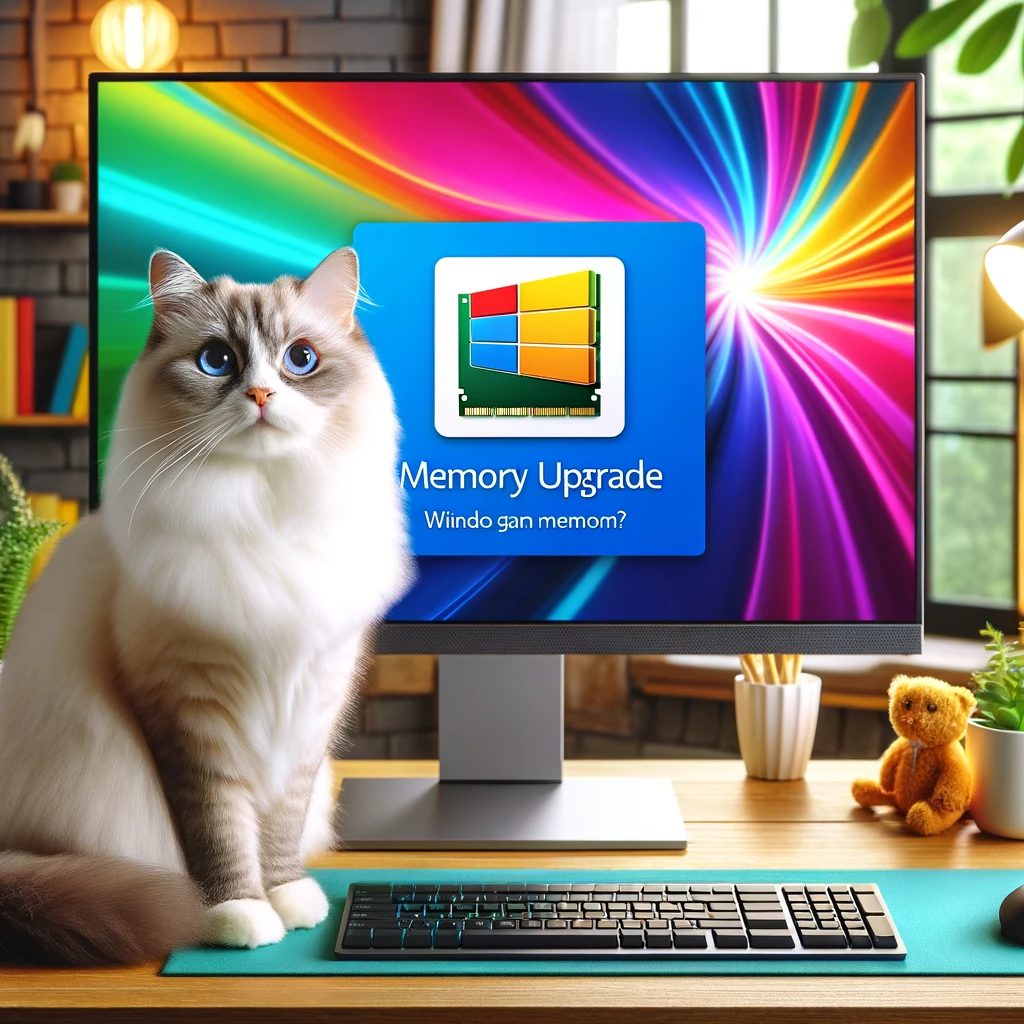
メモリ増設は、PCのパフォーマンスを劇的に向上させる手軽で効果的な方法です。もしPCの動作が遅いと感じているなら、ぜひメモリ増設を検討してみてください。私たち、株式会社クラカズコミュニケーションズでは、プロフェッショナルなスタッフが丁寧に対応いたします。今すぐお問合せいただき、快適なPCライフを手に入れましょう！
お問い合わせはこちらから: お問い合わせフォーム


</description>
<dc:creator></dc:creator>
<dc:subject></dc:subject>
<dc:date>2024-06-07T15:30:00+09:00</dc:date>
<content:encoded><![CDATA[
<div id="cms-editor-minieditor-sin171774323941655200" class="cms-content-parts-sin171774323941663400">
<h3>メモリ増設のススメ: 快適なパフォーマンスを手に入れよう</h3>
<p>現代のPCユーザーにとって、快適なパフォーマンスを維持するための重要な要素の一つがメモリです。特にWindows10およびWindows11を利用している方にとっては、十分なメモリ容量が不可欠です。今回は、メモリ増設の重要性とその具体的なメリットについてご紹介します。</p>
<h4>Windows10には8GB以上、Windows11には16GB以上を推奨</h4>
<p><strong>Windows10ユーザー:</strong> 8GB以上のメモリを推奨します。これにより、複数のアプリケーションを同時に開いてもスムーズに動作し、快適な作業環境を実現できます。</p>
<p><strong>Windows11ユーザー:</strong> 16GB以上のメモリが理想的です。最新のOSはより高度な機能を備えており、それに伴いメモリの消費も増加しています。16GB以上のメモリを搭載することで、最新の機能をフルに活用でき、パフォーマンスの低下を防ぐことができます。</p>
<h4>メモリ増設のメリット</h4>
<ol>
    <li><strong>動作速度の向上</strong>: 多くのアプリケーションを同時に使用してもスムーズに動作します。</li>
    <li><strong>安定性の向上</strong>: システムクラッシュやフリーズのリスクが減少します。</li>
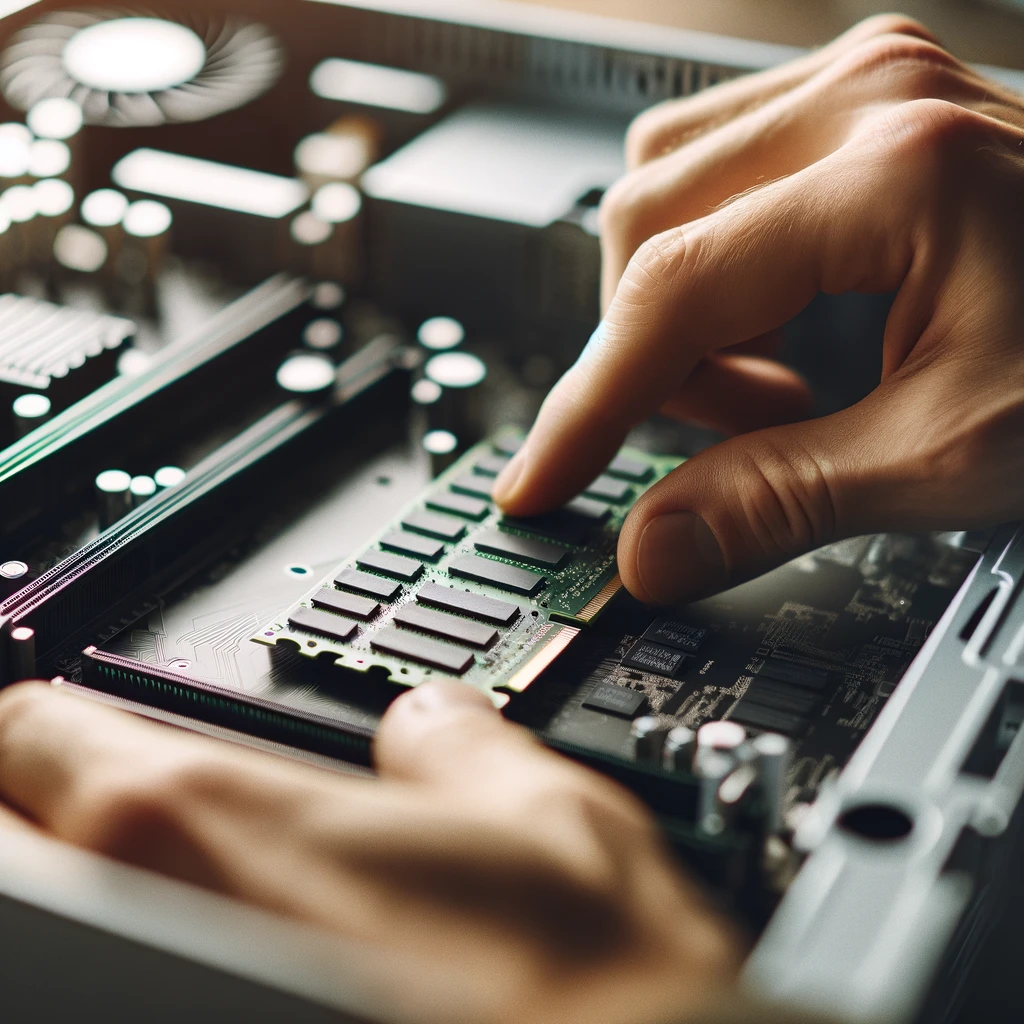
    <li><strong>長寿命化</strong>: ハードディスクやSSDの負荷が軽減され、PC全体の寿命が延びます。<br />
    <img src="https://www.kurakazu.com/images/DALL&#183;E 2024-06-07 15_55_08 - A close-up of a person installing new RAM into a desktop computer_ The focus is on the hands and the RAM slots, with clear visibility of the computer'.png" width="1024" height="1024" alt="" /></li>
</ol>
<h4>メモリ増設の費用概算</h4>
<p>以下の表は、メモリ増設の費用概算を示しています。メモリ部品代と工賃を含めた費用をわかりやすくまとめました。</p>
<table>
    <thead>
        <tr>
            <th>メモリ容量</th>
            <th>部品代&#160;</th>
            <th>工賃</th>
            <th>合計費用</th>
        </tr>
    </thead>
    <tbody>
        <tr>
            <td>8GB</td>
            <td>6,600円</td>
            <td>3,980円</td>
            <td>10,580円</td>
        </tr>
        <tr>
            <td>16GB</td>
            <td>11,000円</td>
            <td>3,980円</td>
            <td>14,980円</td>
        </tr>
        <tr>
            <td>32GB</td>
            <td>19,800円</td>
            <td>3,980円</td>
            <td>23,780円</td>
        </tr>
    </tbody>
</table>
<h4>最後に</h4>
<p>メモリ増設は、PCのパフォーマンスを劇的に向上させる手軽で効果的な方法です。もしPCの動作が遅いと感じているなら、ぜひメモリ増設を検討してみてください。私たち、株式会社クラカズコミュニケーションズでは、プロフェッショナルなスタッフが丁寧に対応いたします。今すぐお問合せいただき、快適なPCライフを手に入れましょう！</p>
<p>お問い合わせはこちらから: <a rel="noreferrer" target="_new">お問い合わせフォーム<br />
<img src="https://www.kurakazu.com/images/DALL&#183;E 2024-06-07 15_54_28 - A desktop computer with a bright and colorful screen displaying the Windows logo and a 'Memory Upgrade' message_ The background shows a cozy home offi.png" width="1024" height="1024" alt="" /><br type="_moz" />
</a></p>
</div>
]]></content:encoded>
</item>

<item rdf:about="https://www.kurakazu.com/blog/2024/04/14885/">
<title>USBメモリのデータ復旧依頼が多くなっています。</title>
<link>https://www.kurakazu.com/blog/2024/04/14885/</link>
<description>USBメモリのみでデータのやり取りをすると危険です。 USBメモリはとても気楽にデータの抜出やパソコン間のデータの移行など、とても気楽に行えますが、その気楽さ故に壊れやすいです。 USBメモリはPCからPCへ持っていくなど、機器間でデータを移動させるツールだと思ってください。 最近USBメモリに大切な写真や会社の大事なデータなどを保管したまま、運用されている方がとても多く壊れたのでなんとかしてほしいと持って来られる方が特に多いと感じています。USBメモリの場合、データ復元が成功する確率はHDDに比べると低いです。 もしこの記事を読んでいる方がいらっしゃいましたら、バックアップをとることをお勧めいたします。</description>
<dc:creator></dc:creator>
<dc:subject></dc:subject>
<dc:date>2024-04-02T15:15:00+09:00</dc:date>
<content:encoded><![CDATA[
<div id="cms-editor-minieditor-sin171203946561816500" class="cms-content-parts-sin171203946561826800"><p>USBメモリのみでデータのやり取りをすると危険です。</p> <p><span style="font-size: 1rem;">USBメモリはとても気楽にデータの抜出やパソコン間のデータの移行など、とても気楽に行えますが、その気楽さ故に壊れやすいです。</span></p> <p><span style="font-size: 1rem;">USBメモリはPCからPCへ持っていくなど、機器間でデータを移動させるツールだと思ってください。</span></p> <p>最近USBメモリに大切な写真や会社の大事なデータなどを保管したまま、運用されている方がとても多く</p><p>壊れたのでなんとかしてほしいと持って来られる方が特に多いと感じています。</p><p>USBメモリの場合、データ復元が成功する確率はHDDに比べると低いです。</p> <p>もしこの記事を読んでいる方がいらっしゃいましたら、バックアップをとることをお勧めいたします。</p></div>
]]></content:encoded>
</item>

<item rdf:about="https://www.kurakazu.com/blog/2023/06/14883/">
<title>中小零細企業の現場におけるDX考察</title>
<link>https://www.kurakazu.com/blog/2023/06/14883/</link>
<description>&#160;最近、DXの相談をよく受けますが、つくづく思うのは、「企業は人なり」という事です。

DXシステムは、お金さえ出せばどんなことでも可能な時代になってきました。AIを組み込むのもよいでしょう。
とりあえずシステムはできます。


しかし・・・
企業に横たわる課題は、実はそんなことではなく、「誰が」「どのタイミングで」「どんなふうに」使いたいかという事に尽きると思います。


つまり、ユーザーのITリテラシーはいかんともしがたく、DXだという前に、クリアしなければいけない企業の問題があるのです。


DXを導入、活用したいならば、最低限次のレベルは越えなければならないと感じる今日この頃です。


１．パソコンがひとり1台存在していること
２．それぞれが自分固有の会社のメールアドレスを持っている事
３．業務（の情報管理）の多くがＰＣやスマホとネットワーク上にあること
４．社員一人一人のＩＴリテラシーがあること（最低、アカウントの概念がわかること）
５．トップが会社の中をＤＸで別会社のように変化させようという強いビジョンをもっていること


このどれがかけていても、中小・零細企業でのＤＸ導入などという事は、夢のまた夢物語なのです。


もしＤＸを始めようと思われる経営者の方がいらっしゃれば、まず、①社員のＩＴ教育、②業務のＩＴ化を実現し、そこからネットワークへの拡張（ＤＸ化）を模索するステップになると考えます。
</description>
<dc:creator></dc:creator>
<dc:subject></dc:subject>
<dc:date>2023-06-23T11:50:00+09:00</dc:date>
<content:encoded><![CDATA[
<div id="cms-editor-minieditor-sin168748880911522400" class="cms-content-parts-sin168748880911530600"><p>&#160;<span style="font-family: inherit; color: rgb(5, 5, 5); font-size: 11.25px; white-space-collapse: preserve;">最近、DXの相談をよく受けますが、つくづく思うのは、「企業は人なり」という事です。</span></p>
<div class="xdj266r x11i5rnm xat24cr x1mh8g0r x1vvkbs x126k92a" style="margin: 0px; white-space-collapse: preserve; overflow-wrap: break-word; font-family: &#34;Segoe UI Historic&#34;, &#34;Segoe UI&#34;, Helvetica, Arial, &#34;hiragino kaku gothic pro&#34;, meiryo, &#34;ms pgothic&#34;, sans-serif; color: rgb(5, 5, 5); font-size: 11.25px;">
<div dir="auto" style="font-family: inherit;">DXシステムは、お金さえ出せばどんなことでも可能な時代になってきました。AIを組み込むのもよいでしょう。</div>
<div dir="auto" style="font-family: inherit;">とりあえずシステムはできます。</div>
</div>
<div class="x11i5rnm xat24cr x1mh8g0r x1vvkbs xtlvy1s x126k92a" style="margin: 0.5em 0px 0px; white-space-collapse: preserve; overflow-wrap: break-word; font-family: &#34;Segoe UI Historic&#34;, &#34;Segoe UI&#34;, Helvetica, Arial, &#34;hiragino kaku gothic pro&#34;, meiryo, &#34;ms pgothic&#34;, sans-serif; color: rgb(5, 5, 5); font-size: 11.25px;">
<div dir="auto" style="font-family: inherit;">しかし・・・</div>
<div dir="auto" style="font-family: inherit;">企業に横たわる課題は、実はそんなことではなく、「誰が」「どのタイミングで」「どんなふうに」使いたいかという事に尽きると思います。</div>
</div>
<div class="x11i5rnm xat24cr x1mh8g0r x1vvkbs xtlvy1s x126k92a" style="margin: 0.5em 0px 0px; white-space-collapse: preserve; overflow-wrap: break-word; font-family: &#34;Segoe UI Historic&#34;, &#34;Segoe UI&#34;, Helvetica, Arial, &#34;hiragino kaku gothic pro&#34;, meiryo, &#34;ms pgothic&#34;, sans-serif; color: rgb(5, 5, 5); font-size: 11.25px;">
<div dir="auto" style="font-family: inherit;">つまり、ユーザーのITリテラシーはいかんともしがたく、DXだという前に、クリアしなければいけない企業の問題があるのです。</div>
</div>
<div class="x11i5rnm xat24cr x1mh8g0r x1vvkbs xtlvy1s x126k92a" style="margin: 0.5em 0px 0px; white-space-collapse: preserve; overflow-wrap: break-word; font-family: &#34;Segoe UI Historic&#34;, &#34;Segoe UI&#34;, Helvetica, Arial, &#34;hiragino kaku gothic pro&#34;, meiryo, &#34;ms pgothic&#34;, sans-serif; color: rgb(5, 5, 5); font-size: 11.25px;">
<div dir="auto" style="font-family: inherit;">DXを導入、活用したいならば、最低限次のレベルは越えなければならないと感じる今日この頃です。</div>
</div>
<div class="x11i5rnm xat24cr x1mh8g0r x1vvkbs xtlvy1s x126k92a" style="margin: 0.5em 0px 0px; white-space-collapse: preserve; overflow-wrap: break-word; font-family: &#34;Segoe UI Historic&#34;, &#34;Segoe UI&#34;, Helvetica, Arial, &#34;hiragino kaku gothic pro&#34;, meiryo, &#34;ms pgothic&#34;, sans-serif; color: rgb(5, 5, 5); font-size: 11.25px;">
<div dir="auto" style="font-family: inherit;">１．パソコンがひとり1台存在していること</div>
<div dir="auto" style="font-family: inherit;">２．それぞれが自分固有の会社のメールアドレスを持っている事</div>
<div dir="auto" style="font-family: inherit;">３．業務（の情報管理）の多くがＰＣやスマホとネットワーク上にあること</div>
<div dir="auto" style="font-family: inherit;">４．社員一人一人のＩＴリテラシーがあること（最低、アカウントの概念がわかること）</div>
<div dir="auto" style="font-family: inherit;">５．トップが会社の中をＤＸで別会社のように変化させようという強いビジョンをもっていること</div>
</div>
<div class="x11i5rnm xat24cr x1mh8g0r x1vvkbs xtlvy1s x126k92a" style="margin: 0.5em 0px 0px; white-space-collapse: preserve; overflow-wrap: break-word; font-family: &#34;Segoe UI Historic&#34;, &#34;Segoe UI&#34;, Helvetica, Arial, &#34;hiragino kaku gothic pro&#34;, meiryo, &#34;ms pgothic&#34;, sans-serif; color: rgb(5, 5, 5); font-size: 11.25px;">
<div dir="auto" style="font-family: inherit;">このどれがかけていても、中小・零細企業でのＤＸ導入などという事は、夢のまた夢物語なのです。</div>
</div>
<div class="x11i5rnm xat24cr x1mh8g0r x1vvkbs xtlvy1s x126k92a" style="margin: 0.5em 0px 0px; white-space-collapse: preserve; overflow-wrap: break-word; font-family: &#34;Segoe UI Historic&#34;, &#34;Segoe UI&#34;, Helvetica, Arial, &#34;hiragino kaku gothic pro&#34;, meiryo, &#34;ms pgothic&#34;, sans-serif; color: rgb(5, 5, 5); font-size: 11.25px;">
<div dir="auto" style="font-family: inherit;">もしＤＸを始めようと思われる経営者の方がいらっしゃれば、まず、①社員のＩＴ教育、②業務のＩＴ化を実現し、そこからネットワークへの拡張（ＤＸ化）を模索するステップになると考えます。</div>
</div></div>
]]></content:encoded>
</item>

<item rdf:about="https://www.kurakazu.com/blog/2023/06/14882/">
<title>＜チャットGPTを会社の仕事で使うためには？＞</title>
<link>https://www.kurakazu.com/blog/2023/06/14882/</link>
<description>最近は、ほんとにチャットGPT花盛りですよね。DXの旬が過ぎたから、次はチャットGPTですか。世の中のトレンドのトレンドは相変わらずですね。

どんどん言葉を変えてあおるけど、実態は何も変わってない。
トレンドの中身も言葉が違うだけで、本質はほとんど同じ。


最近は「チャットCPTで無くなる仕事２５」とか言ってるけど、それって5年前の、「ＡＩでなくなる仕事２５」と同じですよね（ｗ
チャットＧＰＴは、生成型ＡＩなんだから（笑


１．まずチャットGPTでできることを理解しましょう。
２．そして限界も理解しましょう。
３．そのうえで、最も重要なことは、チャットGPTで生成された文章なり、成果物が『確かに正しい』かどうかを、判断できる社員のレベルアップが不可欠だと思います。


そうやって考えると、チャットＧＰＴでできる仕事って、そんなに多くは無い。


30年くらい前に、インターネットが出てきて無くなる仕事、って言ってた時と何も変わってない。


今、インターネットやＳＮＳの情報の何が正しくて、何が間違っているかがわからなければ、本当の意味でインターネットを活用できてないのと、まったく同じ。


当社の仕事で、チャットＧＰＴを使ったら、チェックと修正に時間がかかりすぎて、最初から自分で書いたほうが、最終的には絶対早く終わると思います。(^^♪
</description>
<dc:creator></dc:creator>
<dc:subject></dc:subject>
<dc:date>2023-06-15T08:45:00+09:00</dc:date>
<content:encoded><![CDATA[
<div id="cms-editor-minieditor-sin168748870941273300" class="cms-content-parts-sin168748870941281200"><p><span style="font-family: inherit;">最近は</span><span style="font-family: inherit; color: rgb(5, 5, 5); font-size: 11.25px; white-space-collapse: preserve;">、</span><span style="font-family: inherit; color: rgb(5, 5, 5); font-size: 11.25px; white-space-collapse: preserve;">ほんとにチャットGPT花盛りですよね。DXの旬が過ぎたから、次はチャットGPTですか。世の中のトレンドのトレンドは相変わらずですね。</span></p>
<div class="xdj266r x11i5rnm xat24cr x1mh8g0r x1vvkbs x126k92a" style="margin: 0px; white-space-collapse: preserve; overflow-wrap: break-word; font-family: &#34;Segoe UI Historic&#34;, &#34;Segoe UI&#34;, Helvetica, Arial, &#34;hiragino kaku gothic pro&#34;, meiryo, &#34;ms pgothic&#34;, sans-serif; color: rgb(5, 5, 5); font-size: 11.25px;">
<div dir="auto" style="font-family: inherit;">どんどん言葉を変えてあおるけど、実態は何も変わってない。</div>
<div dir="auto" style="font-family: inherit;">トレンドの中身も言葉が違うだけで、本質はほとんど同じ。</div>
</div>
<div class="x11i5rnm xat24cr x1mh8g0r x1vvkbs xtlvy1s x126k92a" style="margin: 0.5em 0px 0px; white-space-collapse: preserve; overflow-wrap: break-word; font-family: &#34;Segoe UI Historic&#34;, &#34;Segoe UI&#34;, Helvetica, Arial, &#34;hiragino kaku gothic pro&#34;, meiryo, &#34;ms pgothic&#34;, sans-serif; color: rgb(5, 5, 5); font-size: 11.25px;">
<div dir="auto" style="font-family: inherit;">最近は「チャットCPTで無くなる仕事２５」とか言ってるけど、それって5年前の、「ＡＩでなくなる仕事２５」と同じですよね（ｗ</div>
<div dir="auto" style="font-family: inherit;">チャットＧＰＴは、生成型ＡＩなんだから（笑</div>
</div>
<div class="x11i5rnm xat24cr x1mh8g0r x1vvkbs xtlvy1s x126k92a" style="margin: 0.5em 0px 0px; white-space-collapse: preserve; overflow-wrap: break-word; font-family: &#34;Segoe UI Historic&#34;, &#34;Segoe UI&#34;, Helvetica, Arial, &#34;hiragino kaku gothic pro&#34;, meiryo, &#34;ms pgothic&#34;, sans-serif; color: rgb(5, 5, 5); font-size: 11.25px;">
<div dir="auto" style="font-family: inherit;">１．まずチャットGPTでできることを理解しましょう。</div>
<div dir="auto" style="font-family: inherit;">２．そして限界も理解しましょう。</div>
<div dir="auto" style="font-family: inherit;">３．そのうえで、最も重要なことは、チャットGPTで生成された文章なり、成果物が『確かに正しい』かどうかを、判断できる社員のレベルアップが不可欠だと思います。</div>
</div>
<div class="x11i5rnm xat24cr x1mh8g0r x1vvkbs xtlvy1s x126k92a" style="margin: 0.5em 0px 0px; white-space-collapse: preserve; overflow-wrap: break-word; font-family: &#34;Segoe UI Historic&#34;, &#34;Segoe UI&#34;, Helvetica, Arial, &#34;hiragino kaku gothic pro&#34;, meiryo, &#34;ms pgothic&#34;, sans-serif; color: rgb(5, 5, 5); font-size: 11.25px;">
<div dir="auto" style="font-family: inherit;">そうやって考えると、チャットＧＰＴでできる仕事って、そんなに多くは無い。</div>
</div>
<div class="x11i5rnm xat24cr x1mh8g0r x1vvkbs xtlvy1s x126k92a" style="margin: 0.5em 0px 0px; white-space-collapse: preserve; overflow-wrap: break-word; font-family: &#34;Segoe UI Historic&#34;, &#34;Segoe UI&#34;, Helvetica, Arial, &#34;hiragino kaku gothic pro&#34;, meiryo, &#34;ms pgothic&#34;, sans-serif; color: rgb(5, 5, 5); font-size: 11.25px;">
<div dir="auto" style="font-family: inherit;">30年くらい前に、インターネットが出てきて無くなる仕事、って言ってた時と何も変わってない。</div>
</div>
<div class="x11i5rnm xat24cr x1mh8g0r x1vvkbs xtlvy1s x126k92a" style="margin: 0.5em 0px 0px; white-space-collapse: preserve; overflow-wrap: break-word; font-family: &#34;Segoe UI Historic&#34;, &#34;Segoe UI&#34;, Helvetica, Arial, &#34;hiragino kaku gothic pro&#34;, meiryo, &#34;ms pgothic&#34;, sans-serif; color: rgb(5, 5, 5); font-size: 11.25px;">
<div dir="auto" style="font-family: inherit;">今、インターネットやＳＮＳの情報の何が正しくて、何が間違っているかがわからなければ、本当の意味でインターネットを活用できてないのと、まったく同じ。</div>
</div>
<div class="x11i5rnm xat24cr x1mh8g0r x1vvkbs xtlvy1s x126k92a" style="margin: 0.5em 0px 0px; white-space-collapse: preserve; overflow-wrap: break-word; font-family: &#34;Segoe UI Historic&#34;, &#34;Segoe UI&#34;, Helvetica, Arial, &#34;hiragino kaku gothic pro&#34;, meiryo, &#34;ms pgothic&#34;, sans-serif; color: rgb(5, 5, 5); font-size: 11.25px;">
<div dir="auto" style="font-family: inherit;">当社の仕事で、チャットＧＰＴを使ったら、チェックと修正に時間がかかりすぎて、最初から自分で書いたほうが、最終的には絶対早く終わると思います。(^^♪</div>
</div></div>
]]></content:encoded>
</item>

<item rdf:about="https://www.kurakazu.com/blog/2023/06/14881/">
<title>outlookでたくさんの中から目的のメールを探す方法</title>
<link>https://www.kurakazu.com/blog/2023/06/14881/</link>
<description>&#160;＜大量のメールフォルダの中から目的のメールを探す方法＞

こんにちは、クラカズでございます。
今日はメールの中から、あるメールを探したい時のちょっとした工夫をすると、すっきり素早く見つかるという情報です。
※いろんなメールソフトがありますので、同じような機能をさがしてください。今回はMicrosoft社のoutlookについてご紹介します。


たくさんの受信メールの中から、メールを探す「検索」機能については、ご存じだと思いますが、ご存じない方のために復習です。


outlookでは、一番上の窓に、文字を入力すれば、全てのフォルダから該当するメールを探してくれます。


ただ、ここでワンポイント。
検索文字入力欄の左にあるメニューボックスをクリックすれば、場所を選べます。明らかにこのフォルダだとわかっている場合は、そのフォルダを選びましょう。
語句に該当する候補が減って、見つけやすくなるでしょう。


二つ目は、検索語の入力方法です。
そのまま打てば、outlookは「部分一致」という設定で探します。
つまり入力した語句の一部が該当するものを「勝手に」分解して選んできます。
だから関係ないものも「一部の文字が一致している」というだけで選んできます。関係ないメールがたくさん出てきてイラっとする人もいると思います。
そういう時は&#8221;語句&#34;という感じで&#34;&#34;で囲って入力しましょう。そうすると「完全一致」で探してくれるので、こんどは入力した文字が全部一致していないと検索結果に出ません。
つまりぐっと候補が減るので、探しやすくなるというわけです。
ぜひお試しください。(#^.^#)
</description>
<dc:creator></dc:creator>
<dc:subject></dc:subject>
<dc:date>2023-06-08T16:40:00+09:00</dc:date>
<content:encoded><![CDATA[
<div id="cms-editor-minieditor-sin168621043311350700" class="cms-content-parts-sin168621043311358800"><p>&#160;<span style="font-family: inherit; color: rgb(5, 5, 5); font-size: 11.25px; white-space-collapse: preserve;">＜大量のメールフォルダの中から目的のメールを探す方法＞</span></p>
<div class="x11i5rnm xat24cr x1mh8g0r x1vvkbs xtlvy1s x126k92a" style="margin: 0.5em 0px 0px; white-space-collapse: preserve; overflow-wrap: break-word; font-family: &#34;Segoe UI Historic&#34;, &#34;Segoe UI&#34;, Helvetica, Arial, &#34;hiragino kaku gothic pro&#34;, meiryo, &#34;ms pgothic&#34;, sans-serif; color: rgb(5, 5, 5); font-size: 11.25px;">
<div dir="auto" style="font-family: inherit;">こんにちは、クラカズでございます。</div>
<div dir="auto" style="font-family: inherit;">今日はメールの中から、あるメールを探したい時のちょっとした工夫をすると、すっきり素早く見つかるという情報です。</div>
<div dir="auto" style="font-family: inherit;">※いろんなメールソフトがありますので、同じような機能をさがしてください。今回はMicrosoft社のoutlookについてご紹介します。</div>
</div>
<div class="x11i5rnm xat24cr x1mh8g0r x1vvkbs xtlvy1s x126k92a" style="margin: 0.5em 0px 0px; white-space-collapse: preserve; overflow-wrap: break-word; font-family: &#34;Segoe UI Historic&#34;, &#34;Segoe UI&#34;, Helvetica, Arial, &#34;hiragino kaku gothic pro&#34;, meiryo, &#34;ms pgothic&#34;, sans-serif; color: rgb(5, 5, 5); font-size: 11.25px;">
<div dir="auto" style="font-family: inherit;">たくさんの受信メールの中から、メールを探す「検索」機能については、ご存じだと思いますが、ご存じない方のために復習です。</div>
</div>
<div class="x11i5rnm xat24cr x1mh8g0r x1vvkbs xtlvy1s x126k92a" style="margin: 0.5em 0px 0px; white-space-collapse: preserve; overflow-wrap: break-word; font-family: &#34;Segoe UI Historic&#34;, &#34;Segoe UI&#34;, Helvetica, Arial, &#34;hiragino kaku gothic pro&#34;, meiryo, &#34;ms pgothic&#34;, sans-serif; color: rgb(5, 5, 5); font-size: 11.25px;">
<div dir="auto" style="font-family: inherit;">outlookでは、一番上の窓に、文字を入力すれば、全てのフォルダから該当するメールを探してくれます。</div>
</div>
<div class="x11i5rnm xat24cr x1mh8g0r x1vvkbs xtlvy1s x126k92a" style="margin: 0.5em 0px 0px; white-space-collapse: preserve; overflow-wrap: break-word; font-family: &#34;Segoe UI Historic&#34;, &#34;Segoe UI&#34;, Helvetica, Arial, &#34;hiragino kaku gothic pro&#34;, meiryo, &#34;ms pgothic&#34;, sans-serif; color: rgb(5, 5, 5); font-size: 11.25px;">
<div dir="auto" style="font-family: inherit;">ただ、ここでワンポイント。</div>
<div dir="auto" style="font-family: inherit;">検索文字入力欄の左にあるメニューボックスをクリックすれば、場所を選べます。明らかにこのフォルダだとわかっている場合は、そのフォルダを選びましょう。</div>
<div dir="auto" style="font-family: inherit;">語句に該当する候補が減って、見つけやすくなるでしょう。</div>
</div>
<div class="x11i5rnm xat24cr x1mh8g0r x1vvkbs xtlvy1s x126k92a" style="margin: 0.5em 0px 0px; white-space-collapse: preserve; overflow-wrap: break-word; font-family: &#34;Segoe UI Historic&#34;, &#34;Segoe UI&#34;, Helvetica, Arial, &#34;hiragino kaku gothic pro&#34;, meiryo, &#34;ms pgothic&#34;, sans-serif; color: rgb(5, 5, 5); font-size: 11.25px;">
<div dir="auto" style="font-family: inherit;">二つ目は、検索語の入力方法です。</div>
<div dir="auto" style="font-family: inherit;">そのまま打てば、outlookは「部分一致」という設定で探します。</div>
<div dir="auto" style="font-family: inherit;">つまり入力した語句の一部が該当するものを「勝手に」分解して選んできます。</div>
<div dir="auto" style="font-family: inherit;">だから関係ないものも「一部の文字が一致している」というだけで選んできます。関係ないメールがたくさん出てきてイラっとする人もいると思います。</div>
<div dir="auto" style="font-family: inherit;">そういう時は&#8221;語句&#34;という感じで&#34;&#34;で囲って入力しましょう。そうすると「完全一致」で探してくれるので、こんどは入力した文字が全部一致していないと検索結果に出ません。</div>
<div dir="auto" style="font-family: inherit;">つまりぐっと候補が減るので、探しやすくなるというわけです。</div>
<div dir="auto" style="font-family: inherit;">ぜひお試しください。(#^.^#)</div>
</div></div>
]]></content:encoded>
</item>

<item rdf:about="https://www.kurakazu.com/blog/2023/06/14879/">
<title>インクジェットプリンタのインク不足にはご注意！</title>
<link>https://www.kurakazu.com/blog/2023/06/14879/</link>
<description>&#160;インクジェットプリンタのインク不足サインは、重要なサインです。
あまり軽く考えない方が良いです、というお話。
インクジェットプリンタのインク不足警告は、カートリッジのインクが無くなったサインです。

しかし、カートリッジからノズルまでの間に残ったインクで、まだ印刷ができる場合があります。
だから、「もう少し大丈夫やろ」と印刷を続けて、いよいよ印字ができなくなってから交換すると・・・

カートリッジからノズルまでの間に空間ができて、カートリッジを替えてもうまくインクが流れず、印刷ができなくなったり、だんだんとプリンタの動作がおかしくなって・・・
最悪プリンタが壊れて買換えになる事例もありました。

くれぐれもインクの数滴がもったいないと、使い続けることが無いように（笑。</description>
<dc:creator></dc:creator>
<dc:subject></dc:subject>
<dc:date>2023-06-02T11:30:00+09:00</dc:date>
<content:encoded><![CDATA[
<div id="cms-editor-minieditor-sin168593236910222200" class="cms-content-parts-sin168593236910230100"><p>&#160;インクジェットプリンタのインク不足サインは、重要なサインです。<br />
あまり軽く考えない方が良いです、というお話。<br />
インクジェットプリンタのインク不足警告は、カートリッジのインクが無くなったサインです。<br />
<br />
しかし、カートリッジからノズルまでの間に残ったインクで、まだ印刷ができる場合があります。<br />
だから、「もう少し大丈夫やろ」と印刷を続けて、いよいよ印字ができなくなってから交換すると・・・<br />
<br />
カートリッジからノズルまでの間に空間ができて、カートリッジを替えてもうまくインクが流れず、印刷ができなくなったり、だんだんとプリンタの動作がおかしくなって・・・<br />
最悪プリンタが壊れて買換えになる事例もありました。<br />
<br />
くれぐれもインクの数滴がもったいないと、使い続けることが無いように（笑。</p></div>
]]></content:encoded>
</item>

<item rdf:about="https://www.kurakazu.com/blog/2023/05/14880/">
<title>SSDで3倍速！のチューンナップ</title>
<link>https://www.kurakazu.com/blog/2023/05/14880/</link>
<description>
&#160;SSDとHDDの速度差は約10倍です。つまり理論的には、乗せ換えることで10倍ディスクアクセスは上がります。ただし、パソコンの速度には、ディスク装置以外にいろんな部品がかかわります。
つまり、メモリや回路、グラフィック系、そして画面の表示速度やアプリケーションソフトの性能など・・・etc．
それらが複雑に合わさるので一概に10倍！とはなりません。
　
SSD以外の部品が遅いから、そこで速度が遅くなる（ボトルネックの状態）からです。
もし、メモリの量が少ないようでしたら、最低８ＧＢくらいには増設するといいでしょう。
　
できることをいろいろやれば、買い替えるよりは安価で、しかもやはりＳＳＤがとても速いので、経験的にだいたい２～３倍にはなります。
今お使いのパソコンの動作が、半分から１／３の速度になると思えはわかりやすいでしょう。

起動に１分間かかっているならば、２０秒くらいにはなるかも・・・
という感じです。ぜひ一度お試しください。
当社のＳＳＤ換装は、やってみたけど思ったより遅かったとご不満の場合は無料で元の状態に戻す、返金保証が付いております。
　
だから、とりあえずやってみて、良かったらそのまま使う。
期待外れだったら無料で元に戻すということでＯＫです。
一度、ためしてみませんか？
</description>
<dc:creator></dc:creator>
<dc:subject></dc:subject>
<dc:date>2023-05-29T12:05:00+09:00</dc:date>
<content:encoded><![CDATA[
<div id="cms-editor-minieditor-sin168593510349113900" class="cms-content-parts-sin168593510349121700">
<p>&#160;SSDとHDDの速度差は約10倍です。つまり理論的には、乗せ換えることで10倍ディスクアクセスは上がります。ただし、パソコンの速度には、ディスク装置以外にいろんな部品がかかわります。</p>
<div>つまり、メモリや回路、グラフィック系、そして画面の表示速度やアプリケーションソフトの性能など・・・etc．</div>
<div>それらが複雑に合わさるので一概に10倍！とはなりません。</div>
<div>　</div>
<div>SSD以外の部品が遅いから、そこで速度が遅くなる（ボトルネックの状態）からです。</div>
<div>もし、メモリの量が少ないようでしたら、最低８ＧＢくらいには増設するといいでしょう。</div>
<div>　</div>
<div>できることをいろいろやれば、買い替えるよりは安価で、しかもやはりＳＳＤがとても速いので、経験的にだいたい２～３倍にはなります。</div>
<div>今お使いのパソコンの動作が、半分から１／３の速度になると思えはわかりやすいでしょう。</div>
<div></div>
<div>起動に１分間かかっているならば、２０秒くらいにはなるかも・・・</div>
<div>という感じです。ぜひ一度お試しください。</div>
<div>当社のＳＳＤ換装は、やってみたけど思ったより遅かったとご不満の場合は無料で元の状態に戻す、返金保証が付いております。</div>
<div>　</div>
<div>だから、とりあえずやってみて、良かったらそのまま使う。</div>
<div>期待外れだったら無料で元に戻すということでＯＫです。</div>
<div>一度、ためしてみませんか？</div>
</div>
]]></content:encoded>
</item>

<item rdf:about="https://www.kurakazu.com/blog/2023/05/14519/">
<title>あんしん会員はあんしんです。</title>
<link>https://www.kurakazu.com/blog/2023/05/14519/</link>
<description>
&#160;遠隔サポート
最近は、ＰＣサポートもオンラインになって、居ながらにしてお客様のパソコンを操作できるようになったので、本当に便利です。

お客様も我々も、移動時間と手間が軽減されますから。(#^.^#)


ネットさえつながっていれば、大概のことはいかなくてもできます。同じ画面を見ているので、電話で状況をお聞きするようなことに比べると格段に状況がわかるので、話が早いのです。(^^♪


オンラインで、トラブル解決やわからないことを教えたりしていると「ああ、こういうことも苦手というか、分からないんだなぁ」と気が付きます。
と、同時に「これでは我々の『パソコンサポート』という分野は無くならないなと、26歳のころに「パソコンの使い方を教える会社を作ろう」と思ったことは間違いではなかったなと、つくづく思います。(#^.^#)


皆さんも、技術の進化になかなかついていけず、戸惑われることも多いと思います。
ぜひ、そんな時はわが社へご連絡ください。


懇切丁寧に、お教えいたします。
また年会費19,800円（税込み）で、何度でも何回でも、追加費用なしに様々なトラブル解決や操作指導が受けられる「あんしん会員」にご入会ください。


きっとパソコンで何かをする時に、心強く感じていただけるのではないでしょうか。


ぜひご検討ください。詳しくは下記リンクより
https://www.kurakazu.com/kurakazumembers/


</description>
<dc:creator></dc:creator>
<dc:subject></dc:subject>
<dc:date>2023-05-19T11:45:00+09:00</dc:date>
<content:encoded><![CDATA[
<div id="cms-editor-minieditor-sin168456165261443600" class="cms-content-parts-sin168456165261451700">
<p>&#160;<strong>遠隔サポート</strong></p>
<p><span style="font-size: medium;"><span style="font-family: inherit; color: rgb(5, 5, 5); white-space: pre-wrap;">最近は、ＰＣサポートもオンラインになって、居ながらにしてお客様のパソコンを操作できるようになったので、本当に便利です。</span></span></p>
<div class="xdj266r x11i5rnm xat24cr x1mh8g0r x1vvkbs x126k92a" style="margin: 0px; white-space: pre-wrap; overflow-wrap: break-word; font-family: &#34;Segoe UI Historic&#34;, &#34;Segoe UI&#34;, Helvetica, Arial, &#34;hiragino kaku gothic pro&#34;, meiryo, &#34;ms pgothic&#34;, sans-serif; color: rgb(5, 5, 5); font-size: 11.25px;">
<div dir="auto" style="font-family: inherit;"><span style="font-size: medium;">お客様も我々も、移動時間と手間が軽減されますから。(#^.^#)</span></div>
</div>
<div class="x11i5rnm xat24cr x1mh8g0r x1vvkbs xtlvy1s x126k92a" style="margin: 0.5em 0px 0px; white-space: pre-wrap; overflow-wrap: break-word; font-family: &#34;Segoe UI Historic&#34;, &#34;Segoe UI&#34;, Helvetica, Arial, &#34;hiragino kaku gothic pro&#34;, meiryo, &#34;ms pgothic&#34;, sans-serif; color: rgb(5, 5, 5); font-size: 11.25px;">
<div dir="auto" style="font-family: inherit;"><span style="font-size: medium;">ネットさえつながっていれば、大概のことはいかなくてもできます。同じ画面を見ているので、電話で状況をお聞きするようなことに比べると格段に状況がわかるので、話が早いのです。(^^♪</span></div>
</div>
<div class="x11i5rnm xat24cr x1mh8g0r x1vvkbs xtlvy1s x126k92a" style="margin: 0.5em 0px 0px; white-space: pre-wrap; overflow-wrap: break-word; font-family: &#34;Segoe UI Historic&#34;, &#34;Segoe UI&#34;, Helvetica, Arial, &#34;hiragino kaku gothic pro&#34;, meiryo, &#34;ms pgothic&#34;, sans-serif; color: rgb(5, 5, 5); font-size: 11.25px;">
<div dir="auto" style="font-family: inherit;"><span style="font-size: medium;">オンラインで、トラブル解決やわからないことを教えたりしていると「ああ、こういうことも苦手というか、分からないんだなぁ」と気が付きます。</span></div>
<div dir="auto" style="font-family: inherit;"><span style="font-size: medium;">と、同時に「これでは我々の『パソコンサポート』という分野は無くならないなと、26歳のころに「パソコンの使い方を教える会社を作ろう」と思ったことは間違いではなかったなと、つくづく思います。(#^.^#)</span></div>
</div>
<div class="x11i5rnm xat24cr x1mh8g0r x1vvkbs xtlvy1s x126k92a" style="margin: 0.5em 0px 0px; white-space: pre-wrap; overflow-wrap: break-word; font-family: &#34;Segoe UI Historic&#34;, &#34;Segoe UI&#34;, Helvetica, Arial, &#34;hiragino kaku gothic pro&#34;, meiryo, &#34;ms pgothic&#34;, sans-serif; color: rgb(5, 5, 5); font-size: 11.25px;">
<div dir="auto" style="font-family: inherit;"><span style="font-size: medium;">皆さんも、技術の進化になかなかついていけず、戸惑われることも多いと思います。</span></div>
<div dir="auto" style="font-family: inherit;"><span style="font-size: medium;">ぜひ、そんな時はわが社へご連絡ください。</span></div>
</div>
<div class="x11i5rnm xat24cr x1mh8g0r x1vvkbs xtlvy1s x126k92a" style="margin: 0.5em 0px 0px; white-space: pre-wrap; overflow-wrap: break-word; font-family: &#34;Segoe UI Historic&#34;, &#34;Segoe UI&#34;, Helvetica, Arial, &#34;hiragino kaku gothic pro&#34;, meiryo, &#34;ms pgothic&#34;, sans-serif; color: rgb(5, 5, 5); font-size: 11.25px;">
<div dir="auto" style="font-family: inherit;"><span style="font-size: medium;">懇切丁寧に、お教えいたします。</span></div>
<div dir="auto" style="font-family: inherit;"><span style="font-size: medium;">また年会費19,800円（税込み）で、何度でも何回でも、追加費用なしに様々なトラブル解決や操作指導が受けられる「あんしん会員」にご入会ください。</span></div>
</div>
<div class="x11i5rnm xat24cr x1mh8g0r x1vvkbs xtlvy1s x126k92a" style="margin: 0.5em 0px 0px; white-space: pre-wrap; overflow-wrap: break-word; font-family: &#34;Segoe UI Historic&#34;, &#34;Segoe UI&#34;, Helvetica, Arial, &#34;hiragino kaku gothic pro&#34;, meiryo, &#34;ms pgothic&#34;, sans-serif; color: rgb(5, 5, 5); font-size: 11.25px;">
<div dir="auto" style="font-family: inherit;"><span style="font-size: medium;">きっとパソコンで何かをする時に、心強く感じていただけるのではないでしょうか。</span></div>
</div>
<div class="x11i5rnm xat24cr x1mh8g0r x1vvkbs xtlvy1s x126k92a" style="margin: 0.5em 0px 0px; white-space: pre-wrap; overflow-wrap: break-word; font-family: &#34;Segoe UI Historic&#34;, &#34;Segoe UI&#34;, Helvetica, Arial, &#34;hiragino kaku gothic pro&#34;, meiryo, &#34;ms pgothic&#34;, sans-serif; color: rgb(5, 5, 5); font-size: 11.25px;">
<div dir="auto" style="font-family: inherit;"><span style="font-size: medium;">ぜひご検討ください。詳しくは下記リンクより</span></div>
<p><a href="https://www.kurakazu.com/kurakazumembers/">https://www.kurakazu.com/kurakazumembers/</a></p>
<p></p>
</div>
</div>
]]></content:encoded>
</item>

<item rdf:about="https://www.kurakazu.com/blog/2023/05/14516/">
<title>自分のサイトはどう見えてる？</title>
<link>https://www.kurakazu.com/blog/2023/05/14516/</link>
<description>
&#160;知らぬは我が身ばかりなり・・・

ちょっと意味は違いますが、「ホームページのSSLサーバー証明書」は適用済みでしょうか？


案外知られてないですが、SSLサーバー証明書がないと、インターネット上でブラウザが警告を発します。
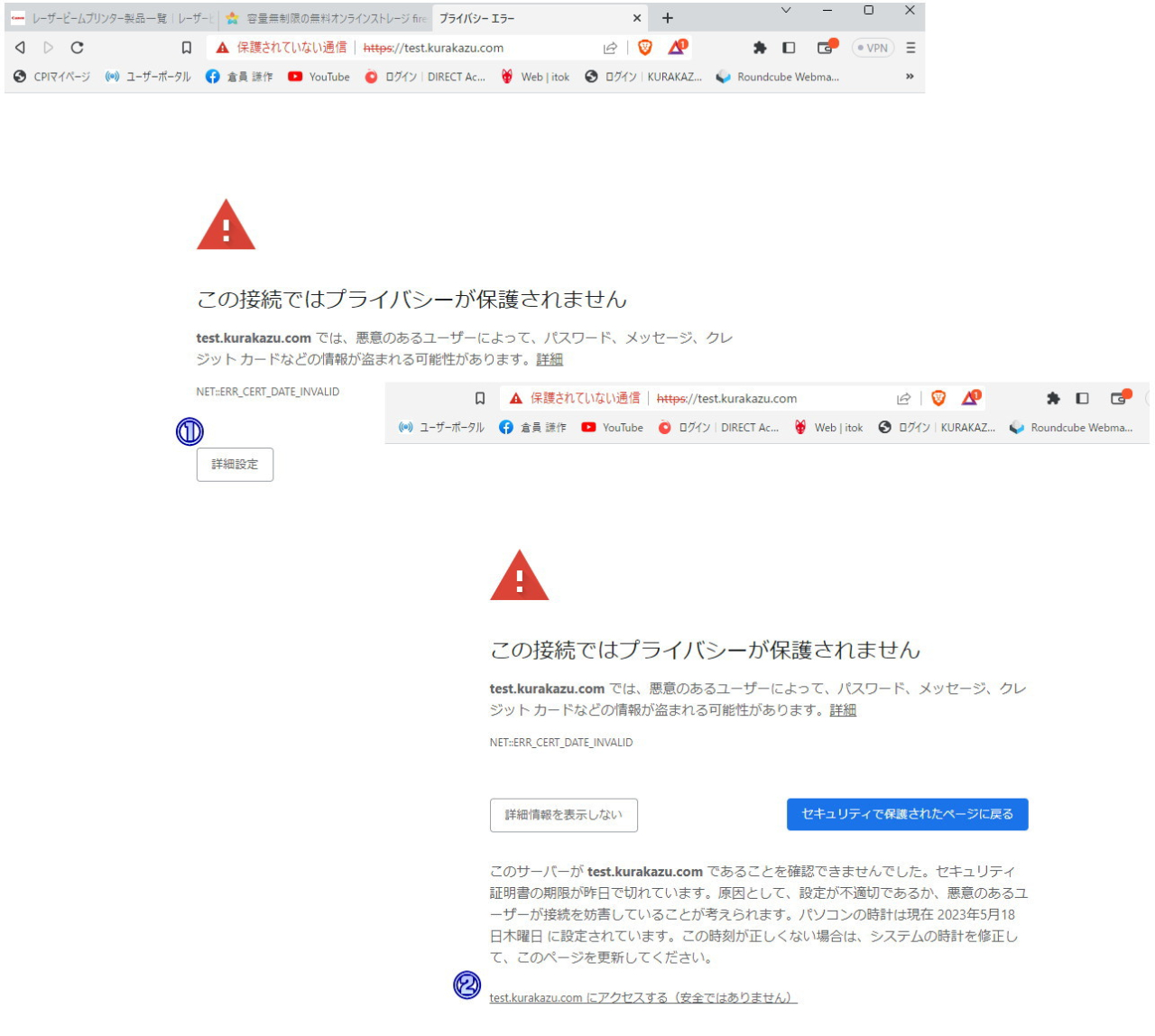
このサイトは、「安全ではありません」と。(#^.^#)


なぜ知らないかというと、理由は社内で自社のWebサイトは何度も見ているので、ブラウザソフト（EdgeやGoogle Chrome など）がCookie（ユーザーが自ら入力した情報を保存しておく機能） を保存しているため、問題なく自動的にサイトが表示されるからです。


しかし、初めて訪問した人には、現在Googleその他が、閲覧者の情報を守るために推奨する（本当は新たなネット利権？といううわさも）「SSLサーバー証明書」がないと（http://で始まるサイト。SSLが設置されると、https://となります）画面に「このサイトは安全ではありません！」と警告され、止まります。


訪問者は、「それでもサイトへ行く（安全ではありません）」のところのリンクをクリックして、はじめてWebサイトへ飛ぶようになっていたのです。


それに気が付いてらっしゃらない（ｗ


最近では、そのサイトへのリンクが、ご丁寧に「安全ではないという警告を発するページの、さらに『詳細設定』をクリックして次の画面に行かないと、サイトへのリンクが（これも本当に小さな文字で）表示されません。


つまり、新規訪問者がそのまま、気が付かないでＷｅｂサイトへ行かずに去ってしまう（ご丁寧に「戻る」はとても目立つアイコンです）(#^.^#)
という事になりかねないのです。


そのためサイト管理者は、あらたなＳＳＬサーバー証明書（サーバーによって異なるため、無料にしているところから、15万円超のものも）を購入（一年間有効）しないといけなくなりました。


つまり、これがネット利権と言われるゆえんです。


ほんと、ネット社会では神様（Google様）には逆らえないので、当社もお客様には、随時啓蒙、紹介していますが・・・
何分費用がかかるので、あまり進んでいません。


たぶん、初めてのお客様に、自分の会社のページがどんなに見えているか、ご存じないのでしょうね。
知ってたら、背に腹は代えられないと、必ず購入されるとおもうんですけどねぇ。(#^.^#)


</description>
<dc:creator></dc:creator>
<dc:subject></dc:subject>
<dc:date>2023-05-11T14:35:00+09:00</dc:date>
<content:encoded><![CDATA[
<div id="cms-editor-minieditor-sin168456129565785000" class="cms-content-parts-sin168456129565793500">
<p>&#160;<span style="font-size: larger;"><strong><span style="font-family: inherit; color: rgb(5, 5, 5); white-space: pre-wrap;">知らぬは我が身ばかりなり・・・</span></strong></span></p>
<div class="xdj266r x11i5rnm xat24cr x1mh8g0r x1vvkbs x126k92a" style="margin: 0px; white-space: pre-wrap; overflow-wrap: break-word; font-family: &#34;Segoe UI Historic&#34;, &#34;Segoe UI&#34;, Helvetica, Arial, &#34;hiragino kaku gothic pro&#34;, meiryo, &#34;ms pgothic&#34;, sans-serif; color: rgb(5, 5, 5); font-size: 11.25px;">
<div dir="auto" style="font-family: inherit;"><span style="font-size: large;">ちょっと意味は違いますが、「ホームページのSSLサーバー証明書」は適用済みでしょうか？</span></div>
</div>
<div class="x11i5rnm xat24cr x1mh8g0r x1vvkbs xtlvy1s x126k92a" style="margin: 0.5em 0px 0px; white-space: pre-wrap; overflow-wrap: break-word; font-family: &#34;Segoe UI Historic&#34;, &#34;Segoe UI&#34;, Helvetica, Arial, &#34;hiragino kaku gothic pro&#34;, meiryo, &#34;ms pgothic&#34;, sans-serif; color: rgb(5, 5, 5); font-size: 11.25px;">
<div dir="auto" style="font-family: inherit;"><span style="font-size: large;">案外知られてないですが、SSLサーバー証明書がないと、インターネット上でブラウザが警告を発します。</span></div>
<div dir="auto" style="font-family: inherit;"><span style="font-size: large;">このサイトは、「安全ではありません」と。(#^.^#)</span></div>
</div>
<div class="x11i5rnm xat24cr x1mh8g0r x1vvkbs xtlvy1s x126k92a" style="margin: 0.5em 0px 0px; white-space: pre-wrap; overflow-wrap: break-word; font-family: &#34;Segoe UI Historic&#34;, &#34;Segoe UI&#34;, Helvetica, Arial, &#34;hiragino kaku gothic pro&#34;, meiryo, &#34;ms pgothic&#34;, sans-serif; color: rgb(5, 5, 5); font-size: 11.25px;">
<div dir="auto" style="font-family: inherit;"><span style="font-size: large;">なぜ知らないかというと、理由は社内で自社のWebサイトは何度も見ているので、ブラウザソフト（EdgeやGoogle Chrome など）がCookie（ユーザーが自ら入力した情報を保存しておく機能） を保存しているため、問題なく自動的にサイトが表示されるからです。</span></div>
</div>
<div class="x11i5rnm xat24cr x1mh8g0r x1vvkbs xtlvy1s x126k92a" style="margin: 0.5em 0px 0px; white-space: pre-wrap; overflow-wrap: break-word; font-family: &#34;Segoe UI Historic&#34;, &#34;Segoe UI&#34;, Helvetica, Arial, &#34;hiragino kaku gothic pro&#34;, meiryo, &#34;ms pgothic&#34;, sans-serif; color: rgb(5, 5, 5); font-size: 11.25px;">
<div dir="auto" style="font-family: inherit;"><span style="font-size: large;">しかし、初めて訪問した人には、現在Googleその他が、閲覧者の情報を守るために推奨する（本当は新たなネット利権？といううわさも）「SSLサーバー証明書」がないと（http://で始まるサイト。SSLが設置されると、https://となります）画面に「このサイトは安全ではありません！」と警告され、止まります。</span></div>
</div>
<div class="x11i5rnm xat24cr x1mh8g0r x1vvkbs xtlvy1s x126k92a" style="margin: 0.5em 0px 0px; white-space: pre-wrap; overflow-wrap: break-word; font-family: &#34;Segoe UI Historic&#34;, &#34;Segoe UI&#34;, Helvetica, Arial, &#34;hiragino kaku gothic pro&#34;, meiryo, &#34;ms pgothic&#34;, sans-serif; color: rgb(5, 5, 5); font-size: 11.25px;">
<div dir="auto" style="font-family: inherit;"><span style="font-size: large;">訪問者は、「それでもサイトへ行く（安全ではありません）」のところのリンクをクリックして、はじめてWebサイトへ飛ぶようになっていたのです。</span></div>
</div>
<div class="x11i5rnm xat24cr x1mh8g0r x1vvkbs xtlvy1s x126k92a" style="margin: 0.5em 0px 0px; white-space: pre-wrap; overflow-wrap: break-word; font-family: &#34;Segoe UI Historic&#34;, &#34;Segoe UI&#34;, Helvetica, Arial, &#34;hiragino kaku gothic pro&#34;, meiryo, &#34;ms pgothic&#34;, sans-serif; color: rgb(5, 5, 5); font-size: 11.25px;">
<div dir="auto" style="font-family: inherit;"><span style="font-size: large;">それに気が付いてらっしゃらない（ｗ</span></div>
</div>
<div class="x11i5rnm xat24cr x1mh8g0r x1vvkbs xtlvy1s x126k92a" style="margin: 0.5em 0px 0px; white-space: pre-wrap; overflow-wrap: break-word; font-family: &#34;Segoe UI Historic&#34;, &#34;Segoe UI&#34;, Helvetica, Arial, &#34;hiragino kaku gothic pro&#34;, meiryo, &#34;ms pgothic&#34;, sans-serif; color: rgb(5, 5, 5); font-size: 11.25px;">
<div dir="auto" style="font-family: inherit;"><span style="font-size: large;">最近では、そのサイトへのリンクが、ご丁寧に「安全ではないという警告を発するページの、さらに『詳細設定』をクリックして次の画面に行かないと、サイトへのリンクが（これも本当に小さな文字で）表示されません。</span></div>
</div>
<div class="x11i5rnm xat24cr x1mh8g0r x1vvkbs xtlvy1s x126k92a" style="margin: 0.5em 0px 0px; white-space: pre-wrap; overflow-wrap: break-word; font-family: &#34;Segoe UI Historic&#34;, &#34;Segoe UI&#34;, Helvetica, Arial, &#34;hiragino kaku gothic pro&#34;, meiryo, &#34;ms pgothic&#34;, sans-serif; color: rgb(5, 5, 5); font-size: 11.25px;">
<div dir="auto" style="font-family: inherit;"><span style="font-size: large;">つまり、新規訪問者がそのまま、気が付かないでＷｅｂサイトへ行かずに去ってしまう（ご丁寧に「戻る」はとても目立つアイコンです）(#^.^#)</span></div>
<div dir="auto" style="font-family: inherit;"><span style="font-size: large;">という事になりかねないのです。</span></div>
</div>
<div class="x11i5rnm xat24cr x1mh8g0r x1vvkbs xtlvy1s x126k92a" style="margin: 0.5em 0px 0px; white-space: pre-wrap; overflow-wrap: break-word; font-family: &#34;Segoe UI Historic&#34;, &#34;Segoe UI&#34;, Helvetica, Arial, &#34;hiragino kaku gothic pro&#34;, meiryo, &#34;ms pgothic&#34;, sans-serif; color: rgb(5, 5, 5); font-size: 11.25px;">
<div dir="auto" style="font-family: inherit;"><span style="font-size: large;">そのためサイト管理者は、あらたなＳＳＬサーバー証明書（サーバーによって異なるため、無料にしているところから、15万円超のものも）を購入（一年間有効）しないといけなくなりました。</span></div>
</div>
<div class="x11i5rnm xat24cr x1mh8g0r x1vvkbs xtlvy1s x126k92a" style="margin: 0.5em 0px 0px; white-space: pre-wrap; overflow-wrap: break-word; font-family: &#34;Segoe UI Historic&#34;, &#34;Segoe UI&#34;, Helvetica, Arial, &#34;hiragino kaku gothic pro&#34;, meiryo, &#34;ms pgothic&#34;, sans-serif; color: rgb(5, 5, 5); font-size: 11.25px;">
<div dir="auto" style="font-family: inherit;"><span style="font-size: large;">つまり、これがネット利権と言われるゆえんです。</span></div>
</div>
<div class="x11i5rnm xat24cr x1mh8g0r x1vvkbs xtlvy1s x126k92a" style="margin: 0.5em 0px 0px; white-space: pre-wrap; overflow-wrap: break-word; font-family: &#34;Segoe UI Historic&#34;, &#34;Segoe UI&#34;, Helvetica, Arial, &#34;hiragino kaku gothic pro&#34;, meiryo, &#34;ms pgothic&#34;, sans-serif; color: rgb(5, 5, 5); font-size: 11.25px;">
<div dir="auto" style="font-family: inherit;"><span style="font-size: large;">ほんと、ネット社会では神様（Google様）には逆らえないので、当社もお客様には、随時啓蒙、紹介していますが・・・</span></div>
<div dir="auto" style="font-family: inherit;"><span style="font-size: large;">何分費用がかかるので、あまり進んでいません。</span></div>
</div>
<div class="x11i5rnm xat24cr x1mh8g0r x1vvkbs xtlvy1s x126k92a" style="margin: 0.5em 0px 0px; white-space: pre-wrap; overflow-wrap: break-word; font-family: &#34;Segoe UI Historic&#34;, &#34;Segoe UI&#34;, Helvetica, Arial, &#34;hiragino kaku gothic pro&#34;, meiryo, &#34;ms pgothic&#34;, sans-serif; color: rgb(5, 5, 5); font-size: 11.25px;">
<div dir="auto" style="font-family: inherit;"><span style="font-size: large;">たぶん、初めてのお客様に、自分の会社のページがどんなに見えているか、ご存じないのでしょうね。</span></div>
<div dir="auto" style="font-family: inherit;"><span style="font-size: large;">知ってたら、背に腹は代えられないと、必ず購入されるとおもうんですけどねぇ。(#^.^#)</span></div>
</div>
</div>
<div class="cms-content-parts-sin168456139714653800 box cparts-id403--01 lay-margin-b--3" data-selectable="cparts-animate cparts-animate--slideInUp:上へスライド,cparts-animate cparts-animate--slideInDown:下へスライド,cparts-animate cparts-animate--slideInLeft:左へスライド,cparts-animate cparts-animate--slideInRight:右へスライド">
<div class="lay-row">
<div class="cparts-img-block lay-img-width--max lay-col12-xs-12"><img alt="SSLサーバー証明書は適用済みでしょうか？" class="cms-easy-edit" id="cms-editor-image-sin168456139714656400" src="https://www.kurakazu.com/images/SSL.jpg" width="675"  title="" name="" /></div>
</div>
</div>
]]></content:encoded>
</item>

<item rdf:about="https://www.kurakazu.com/blog/2023/04/14513/">
<title>インターネットがつながらない／何も表示されない</title>
<link>https://www.kurakazu.com/blog/2023/04/14513/</link>
<description>
&#160;最近続いた事例として、インターネットに接続したときに、白い画面になって情報が表示されないという事が起きております。

まずパソコンの電源を切り、
１．回線終端装置
２．ルーター（ある場合）
３．ハブ（ある場合）
の順に電源を切ります。
１～２分後に、１～３の順に電源を入れます。
それぞれの電源投入の間には２～３分間隔を開けてください。
その後、パソコンを起動し、インターネットを開いてみてください。


これで通常通り使えれば、そのまま様子を見てください。
状況が改善せず、インターネットが表示されない場合は、お問い合わせください。
パソコンを点検し、回線及びルーターなどの通信機器をチェックし、原因を特定いたします。


連休中のお休みは、特に設けず、通常通り社内カレンダーに従って営業いたします。
※特別なことがない限り、定休日は日曜日のみ。
土曜、祝祭日も平日と同様に、9時から18時まで営業しております。

</description>
<dc:creator></dc:creator>
<dc:subject></dc:subject>
<dc:date>2023-04-27T14:30:00+09:00</dc:date>
<content:encoded><![CDATA[
<div id="cms-editor-minieditor-sin168456092608778200" class="cms-content-parts-sin168456092608786300">
<p>&#160;<span style="font-family: inherit; color: rgb(5, 5, 5); font-size: 11.25px; white-space: pre-wrap;">最近続いた事例として、インターネットに接続したときに、白い画面になって情報が表示されないという事が起きております。</span></p>
<div class="xdj266r x11i5rnm xat24cr x1mh8g0r x1vvkbs x126k92a" style="margin: 0px; white-space: pre-wrap; overflow-wrap: break-word; font-family: &#34;Segoe UI Historic&#34;, &#34;Segoe UI&#34;, Helvetica, Arial, &#34;hiragino kaku gothic pro&#34;, meiryo, &#34;ms pgothic&#34;, sans-serif; color: rgb(5, 5, 5); font-size: 11.25px;">
<div dir="auto" style="font-family: inherit;">まずパソコンの電源を切り、</div>
<div dir="auto" style="font-family: inherit;"><strong>１．回線終端装置</strong></div>
<div dir="auto" style="font-family: inherit;"><strong>２．ルーター（ある場合）</strong></div>
<div dir="auto" style="font-family: inherit;"><strong>３．ハブ（ある場合）</strong></div>
<div dir="auto" style="font-family: inherit;">の順に電源を切ります。</div>
<div dir="auto" style="font-family: inherit;">１～２分後に、１～３の順に電源を入れます。</div>
<div dir="auto" style="font-family: inherit;">それぞれの電源投入の間には２～３分間隔を開けてください。</div>
<div dir="auto" style="font-family: inherit;">その後、パソコンを起動し、インターネットを開いてみてください。</div>
</div>
<div class="x11i5rnm xat24cr x1mh8g0r x1vvkbs xtlvy1s x126k92a" style="margin: 0.5em 0px 0px; white-space: pre-wrap; overflow-wrap: break-word; font-family: &#34;Segoe UI Historic&#34;, &#34;Segoe UI&#34;, Helvetica, Arial, &#34;hiragino kaku gothic pro&#34;, meiryo, &#34;ms pgothic&#34;, sans-serif; color: rgb(5, 5, 5); font-size: 11.25px;">
<div dir="auto" style="font-family: inherit;">これで通常通り使えれば、そのまま様子を見てください。</div>
<div dir="auto" style="font-family: inherit;">状況が改善せず、インターネットが表示されない場合は、お問い合わせください。</div>
<div dir="auto" style="font-family: inherit;">パソコンを点検し、回線及びルーターなどの通信機器をチェックし、原因を特定いたします。</div>
</div>
<div class="x11i5rnm xat24cr x1mh8g0r x1vvkbs xtlvy1s x126k92a" style="margin: 0.5em 0px 0px; white-space: pre-wrap; overflow-wrap: break-word; font-family: &#34;Segoe UI Historic&#34;, &#34;Segoe UI&#34;, Helvetica, Arial, &#34;hiragino kaku gothic pro&#34;, meiryo, &#34;ms pgothic&#34;, sans-serif; color: rgb(5, 5, 5); font-size: 11.25px;">
<div dir="auto" style="font-family: inherit;">連休中のお休みは、特に設けず、通常通り社内カレンダーに従って営業いたします。</div>
<div dir="auto" style="font-family: inherit;">※特別なことがない限り、定休日は日曜日のみ。</div>
<div dir="auto" style="font-family: inherit;">土曜、祝祭日も平日と同様に、9時から18時まで営業しております。</div>
</div>
</div>
]]></content:encoded>
</item>

<item rdf:about="https://www.kurakazu.com/blog/2023/04/14205/">
<title>BitLocker回復その二</title>
<link>https://www.kurakazu.com/blog/2023/04/14205/</link>
<description>

今日も、BitLocker回復のお客様。本当に何と言ったらいいか・・・。
社員が何とか頑張って、修復を試みますが、「そう簡単に破れないからセキュリティ機能としての暗号化が有効なんだと思い知る」結果になります。()


せめて、まだ影響がない人（Windows Proユーザー）は、回復キーを作成しておきましょう。保存しておきましょう。紙にメモしておきましょう。(^^♪


&#160;


Tweet 
jQuery(&#039;.fb-iframe&#039;).attr(&#039;src&#039;,&#039;https://www.facebook.com/plugins/share_button.php?href=&#039;+encodeURI(location.href)+&#039;&#38;layout=button&#38;size=small&#38;appId=313723312047325&#38;width=61&#38;height=20&#039;);

&#160;

			jQuery(&#039;.line-it-button&#039;).attr(&#039;data-url&#039;,location.href);
		
 
</description>
<dc:creator></dc:creator>
<dc:subject></dc:subject>
<dc:date>2023-04-18T09:50:00+09:00</dc:date>
<content:encoded><![CDATA[
<div id="cms-editor-minieditor-sin168411189151674600" class="cms-content-parts-sin168411189151683100">
<div class="xdj266r x11i5rnm xat24cr x1mh8g0r x1vvkbs x126k92a" style="margin: 0px; white-space: pre-wrap; overflow-wrap: break-word; font-family: &#34;Segoe UI Historic&#34;, &#34;Segoe UI&#34;, Helvetica, Arial, &#34;hiragino kaku gothic pro&#34;, meiryo, &#34;ms pgothic&#34;, sans-serif; color: rgb(5, 5, 5); font-size: 15px; background-color: rgb(255, 255, 255);">
<div dir="auto" style="font-family: inherit;">今日も、BitLocker回復のお客様。本当に何と言ったらいいか・・・。</div>
<div dir="auto" style="font-family: inherit;">社員が何とか頑張って、修復を試みますが、「そう簡単に破れないからセキュリティ機能としての暗号化が有効なんだと思い知る」結果になります。(<span class="x3nfvp2 x1j61x8r x1fcty0u xdj266r xhhsvwb xat24cr xgzva0m xxymvpz xlup9mm x1kky2od" style="width: 16px; display: inline-flex; margin: 0px 1px; height: 16px; vertical-align: middle; font-family: inherit;"><img height="16" width="16" alt="😭" referrerpolicy="origin-when-cross-origin" src="https://static.xx.fbcdn.net/images/emoji.php/v9/t40/1/16/1f62d.png" /></span>)</div>
</div>
<div class="x11i5rnm xat24cr x1mh8g0r x1vvkbs xtlvy1s x126k92a" style="margin: 0.5em 0px 0px; white-space: pre-wrap; overflow-wrap: break-word; font-family: &#34;Segoe UI Historic&#34;, &#34;Segoe UI&#34;, Helvetica, Arial, &#34;hiragino kaku gothic pro&#34;, meiryo, &#34;ms pgothic&#34;, sans-serif; color: rgb(5, 5, 5); font-size: 15px; background-color: rgb(255, 255, 255);">
<div dir="auto" style="font-family: inherit;">せめて、まだ影響がない人（Windows Proユーザー）は、回復キーを作成しておきましょう。保存しておきましょう。紙にメモしておきましょう。(^^♪</div>
<div dir="auto" style="font-family: inherit;"></div>
</div>
</div>
<div class="cms-content-parts-sin168411238023213300">
<p>&#160;<img src="https://www.kurakazu.com/images/blog/2023.4.18.jpg" width="350" height="234" class="cms-easy-edit" id="cms-editor-image-sin168411238023216800" alt="BitLocker回復" title="" name=""  /></p>
</div>
<div class="cms-content-parts-sin168411226556814700" style="height:24px;margin-top:10px;margin-bottom:20px;text-align:right;">
<div style="display:inline-block;"><a class="twitter-share-button" data-show-count="false" href="https://twitter.com/share?ref_src=twsrc%5Etfw" style="display:none">Tweet</a> <script async src="https://platform.twitter.com/widgets.js" charset="utf-8"></script></div>
<div style="display:inline-block;margin-left:5px;"><iframe allow="encrypted-media" allowtransparency="true" class="fb-iframe" frameborder="0" height="20" scrolling="no" src="" style="border:none;overflow:hidden" width="61"></iframe><script>jQuery('.fb-iframe').attr('src','https://www.facebook.com/plugins/share_button.php?href='+encodeURI(location.href)+'&layout=button&size=small&appId=313723312047325&width=61&height=20');</script></div>
<div style="display:inline-block;margin-left:5px;">
<div class="line-it-button" data-color="default" data-count="false" data-lang="ja" data-size="small" data-type="share-a" data-url="" data-ver="3" style="display: none;">&#160;</div>
<script>
			jQuery('.line-it-button').attr('data-url',location.href);
		</script><script src="https://d.line-scdn.net/r/web/social-plugin/js/thirdparty/loader.min.js" async="async" defer="defer"></script></div>
<div style="display:inline-block;margin-left:5px;"><a class="hatena-bookmark-button" data-hatena-bookmark-lang="ja" data-hatena-bookmark-layout="basic-label" href="https://b.hatena.ne.jp/entry/" title="このエントリーをはてなブックマークに追加"><img alt="このエントリーをはてなブックマークに追加" height="20" src="https://b.st-hatena.com/images/v4/public/entry-button/button-only@2x.png" style="border: none;" width="20" /></a> <script type="text/javascript" src="https://b.st-hatena.com/js/bookmark_button.js" charset="utf-8" async="async"></script></div>
</div>
]]></content:encoded>
</item>

</rdf:RDF>